
Budgeting has a reputation for being difficult, time-consuming, and restrictive. For many people, it means sorting through bank statements, tracking every purchase, and wondering why there’s never as much money left at the end of the month as expected.
Fortunately, artificial intelligence is changing that.
AI can analyze your spending, organize expenses into categories, identify spending habits, recommend realistic savings goals, and even act as a personal budgeting coach. While it won’t replace a financial advisor or make financial decisions for you, it can take much of the frustration out of creating and maintaining a budget.
If you’ve never budgeted before—or you’ve tried and failed—AI can make the process much easier.
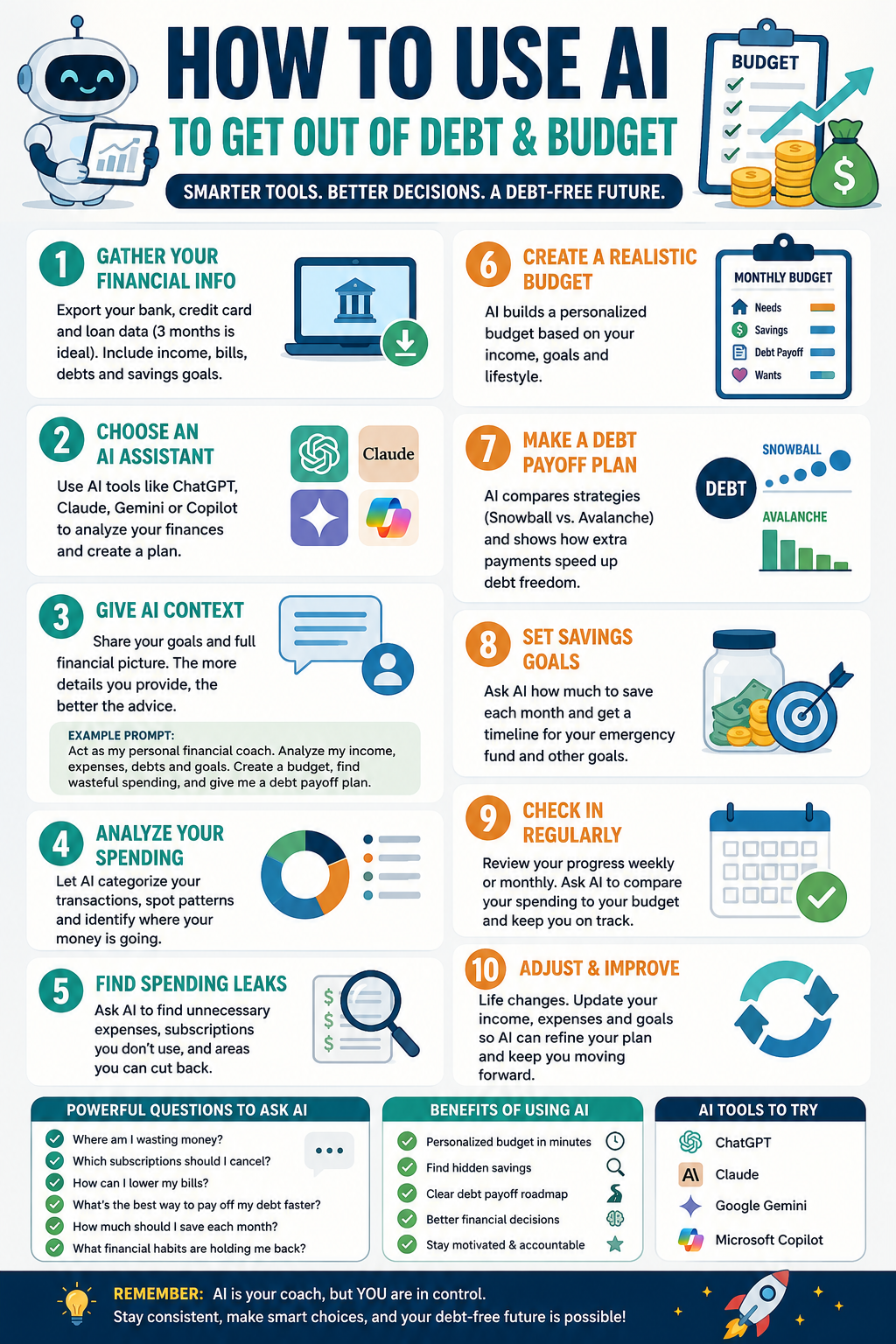
Start by Gathering Your Financial Information
Before asking AI to build a budget, collect some basic financial information. The more accurate your information is, the more personalized the recommendations will be.
Gather your monthly take-home income, recurring bills, debt payments, savings balances, and at least three months of bank and credit card transactions. If you have specific financial goals, such as paying off debt, building an emergency fund, or saving for a vacation, include those as well.
Most banks allow you to export your transaction history as a spreadsheet or CSV file. Before uploading anything, remove sensitive information such as account numbers or personal identification details.
Choose an AI Assistant
Several AI assistants are capable of helping with budgeting, including ChatGPT, Claude, Google Gemini, and Microsoft Copilot.
Each can review your spending, answer financial questions, and generate personalized budget recommendations. The experience is similar across platforms, so choosing one often comes down to personal preference.
Give AI Plenty of Context
One of the biggest mistakes people make is asking AI something vague like, “Create a budget for me.”
Instead, explain your financial situation.
Include your monthly income, regular expenses, debts, savings goals, and any major upcoming expenses. The more information AI has, the more useful its recommendations will be.
Here’s an example prompt you can use:
Act as my personal budgeting coach. Review my monthly income, recurring bills, debts, savings goals, and spending history. Organize my expenses into categories, identify unnecessary spending, recommend a realistic monthly budget, estimate how much I can save each month, and explain your recommendations. Ask follow-up questions before making assumptions.
This prompt encourages AI to ask questions instead of guessing, leading to more accurate advice.
Let AI Analyze Your Spending
Once you’ve provided your financial information, AI can quickly organize your spending into useful categories.
Typical categories include housing, transportation, groceries, restaurants, entertainment, shopping, healthcare, subscriptions, debt payments, and savings.
Seeing your spending organized this way often reveals patterns that are difficult to notice when simply reviewing bank statements.
For example, you may discover you’re spending more on takeout than groceries, or that several small subscriptions are quietly adding up each month.
Find Hidden Spending
One of AI’s biggest strengths is identifying recurring expenses that are easy to overlook.
Ask questions such as:
Where am I spending more than I realize?
Which subscriptions could I cancel?
What purchases happen repeatedly?
Which expenses have increased over the past few months?
Where could I realistically reduce spending without affecting my lifestyle?
These insights often uncover hundreds of dollars in potential savings over the course of a year.
Build a Budget That Fits Your Lifestyle
A good budget shouldn’t force you to give up everything you enjoy.
Instead of creating an unrealistic spending plan, ask AI to recommend a budget based on your actual habits.
If you enjoy eating out occasionally or spending money on hobbies, tell AI. It can adjust your budget while still helping you reach your financial goals.
The goal isn’t perfection. The goal is creating a budget you can actually stick to.
Set Savings Goals
AI can also help you determine how much you should save each month.
Ask questions like:
How long will it take to build a six-month emergency fund?
How quickly can I pay off my credit card debt?
Should I pay extra toward my loan or save more money?
How much can I comfortably save each month?
AI can calculate different scenarios and show how changing your monthly savings or debt payments affects your timeline.
Check In Every Week
Budgeting shouldn’t happen only once a month.
A quick weekly review can help you stay on track.
Simply ask AI to compare your spending for the week with your monthly budget and identify any areas where you’re overspending.
Making small adjustments throughout the month is much easier than trying to fix an entire month’s worth of overspending.
What AI Does Well
AI is especially useful for organizing expenses, identifying spending patterns, creating customized budgets, explaining financial concepts, tracking savings progress, and suggesting practical ways to reduce unnecessary spending.
It can also answer questions whenever you need clarification, making it feel more like a financial coach than a budgeting spreadsheet.
Understand Its Limitations
Although AI is an excellent budgeting assistant, it isn’t perfect.
It doesn’t know your personal priorities unless you explain them. It can’t predict unexpected expenses, and it shouldn’t replace professional financial advice for complex situations involving taxes, investing, or legal matters.
Always review AI’s recommendations before making important financial decisions.
Tips for Better Results
Provide several months of spending history whenever possible.
Be honest about your spending habits.
Include upcoming expenses such as vacations, holidays, or home repairs.
Ask follow-up questions if something doesn’t make sense.
Update your budget regularly as your income or expenses change.
The more information you provide, the more valuable AI becomes.
Final Thoughts
Artificial intelligence isn’t a magic solution, but it is an incredibly useful tool for anyone looking to take control of their finances.
Instead of spending hours organizing transactions and building spreadsheets, AI can analyze your spending in minutes, uncover money leaks, recommend realistic budgets, and help you develop better financial habits.
The best budget is one you can consistently follow. AI can help you build that budget, adjust it as your life changes, and keep you focused on your financial goals.
Whether you’re trying to save more, pay off debt, or simply understand where your money goes each month, AI can make budgeting easier than ever before.
VERTU is one of the most unique brands in the technology industry. While companies like Apple and Samsung focus on selling millions of smartphones each year, VERTU has spent nearly three decades serving a completely different audience. Its products are designed for people who value luxury, craftsmanship, exclusivity, and personalized service as much as they value technology.
The company was founded in 1998 as a luxury division of Nokia. The vision came from designer Frank Nuovo, who believed that mobile phones could become luxury objects in the same way that Swiss watches, designer handbags, and fine jewelry had become symbols of status and personal style. Rather than competing on price or mass-market appeal, VERTU focused on creating handcrafted devices made from premium materials and supported by exclusive services.
The first VERTU phones quickly became known for their distinctive design and extraordinary construction. Unlike typical mobile phones made from plastic and glass, VERTU devices featured sapphire crystal screens, titanium frames, premium leather, and handcrafted assembly. Many models incorporated precious metals and gemstones, turning a communication device into a luxury accessory. One of the brand’s most famous features was a dedicated concierge button that connected owners to a 24-hour lifestyle service capable of assisting with travel arrangements, restaurant reservations, event bookings, and other luxury experiences.
Over the years, VERTU experienced significant changes. Nokia sold the company in 2012, and the brand transitioned to Android-based smartphones. Multiple ownership changes followed, and the company faced financial difficulties that eventually led to bankruptcy proceedings and the closure of its historic manufacturing facilities in the United Kingdom. Many observers believed the brand’s story had come to an end.
Instead of disappearing, VERTU reinvented itself. The company embraced emerging technologies such as artificial intelligence, Web3 services, foldable smartphones, and luxury wearable devices. Today, the brand has reestablished itself as a niche player in the luxury technology market, offering products that combine modern hardware with premium materials and exclusive experiences.
One of VERTU’s most notable current products is the ALPHAFOLD, an AI-powered foldable smartphone aimed at executives, entrepreneurs, and high-net-worth individuals. Unlike mainstream foldable devices, the ALPHAFOLD emphasizes luxury materials, customization options, and productivity-focused artificial intelligence features. The device is designed to serve as both a premium smartphone and a personal business assistant, reflecting VERTU’s growing focus on affluent professionals.
The company also continues to offer its Signature Collection, which pays tribute to the iconic devices that made the brand famous. These phones feature the classic keypad design that became synonymous with VERTU’s early success. While they may not offer the latest smartphone capabilities, they appeal to collectors and customers who appreciate traditional craftsmanship and timeless design.
Beyond smartphones, VERTU has expanded into luxury wearables. The company now offers smartwatches that combine traditional luxury aesthetics with modern health tracking and connectivity features. It has also entered the growing smart ring market, creating wearable devices that blend wellness monitoring and notifications with the appearance of fine jewelry. These products reflect the brand’s broader goal of creating an ecosystem of luxury technology products rather than focusing solely on mobile phones.
One of the primary reasons VERTU products command such high prices is the materials and craftsmanship involved in their production. Sapphire crystal, aerospace-grade titanium, premium leather, carbon fiber, gold, diamonds, and handcrafted assembly all contribute to the cost. Limited production runs and bespoke customization options further increase exclusivity. Some devices cost several thousand dollars, while custom editions can reach tens of thousands of dollars.
Critics have often questioned whether VERTU’s products justify their premium pricing. From a purely technical perspective, many mainstream flagship smartphones offer equal or superior performance at a fraction of the cost. However, VERTU has never positioned itself as a value-oriented technology company. Its customers are purchasing more than specifications. They are buying exclusivity, craftsmanship, personalized service, and a luxury experience that few technology brands can match.
The typical VERTU customer includes business executives, entrepreneurs, luxury collectors, athletes, celebrities, and individuals who appreciate rare and highly customized products. For these buyers, a smartphone is not simply a tool for communication. It is an extension of personal identity and a reflection of lifestyle.
Today, VERTU remains one of the few companies attempting to merge luxury craftsmanship with cutting-edge technology. In an industry focused on mass production and rapid upgrades, the brand continues to pursue a different philosophy. It treats technology not as a disposable commodity but as a luxury object designed to be admired, customized, and treasured. Whether viewed as an innovative luxury pioneer or an extravagant niche brand, VERTU has successfully carved out a place unlike any other company in the smartphone industry.

Tired of wrestling with gas-powered leaf blowers or dealing with tangled cords? The Sihuird Cordless Leaf Blower SL9501 is a game-changer for homeowners looking for serious cleaning power without the hassle. In this review, based on a hands-on gadget test, we’ll break down why this tool stands out for everyday yard work, driveway cleaning, and seasonal leaf battles.
Watch the full 9malls review on YouTube
Unboxing and First Impressions
Right out of the box, this blower feels substantial. It comes with two high-capacity 21V batteries, a dual rapid charger, a comfortable shoulder strap with easy metal clips, multiple tubes, and built-in LED lighting. The design is modern with a cool logo, rubberized non-slip handle, and solid plastic construction that feels durable. It has a safety switch to prevent accidental starts. The shoulder strap makes it comfortable for longer sessions, and the dual battery setup means you can swap or charge both at once.
Tech Specs Highlights
Up to 765 CFM air volume, high wind speeds around 190 MPH, 3 variable speeds plus Turbo mode, brushless motor for efficiency, LED front light for low-light use, and lightweight design.
Real-World Performance Test
In a head-to-head test against an older cordless blower, the Sihuird performed impressively. It blasted wood chips, heavy debris, pine cones, rocks, and leaves with ease where the older model struggled. Turbo mode was described as insane for tough jobs. The built-in LED light is perfect for early mornings or dusk cleanup. Battery life held up well, with dual packs providing extended runtime. It’s loud as expected from a powerful blower but quieter than gas models.
Pros and Cons
Pros:
Cordless freedom with long-lasting batteries
Comfortable ergonomics and shoulder strap
Versatile speeds and Turbo boost
LED light and safety features
Great value with high-quality build
Cons:
Noisy during operation
Heavier than ultra-light models when fully assembled
Who Is It For?
Perfect for homeowners with medium to large yards, patios, driveways, or garages. It handles fall leaves, spring debris, or garage cleanup without the maintenance, fumes, or frustration of gas blowers.
Final Verdict
The Sihuird Cordless Leaf Blower delivers where it matters most: raw power, convenience, and reliability. It exceeded expectations at this price point and comes highly recommended as a great value upgrade.Ready to upgrade your yard game? Check it out on Amazon. This post is inspired by a 9malls review video. Always verify current specs and pricing. What’s your biggest yard cleanup headache? This blower might just solve it!
AI video generators are everywhere in 2026, but two names keep appearing at the top of comparison lists: Pictory and InVideo. Both can turn text into videos, generate voiceovers, create social media content, and automate editing. The real question is which platform delivers more value for creators who are actually paying the subscription.
Let’s compare the numbers.
Pictory Pricing
Pictory’s Starter plan costs approximately $25-$29 per month and includes 200 video minutes, 5 GB of storage, one brand kit, 60 minutes of ElevenLabs AI voice generation, and access to millions of stock videos from Getty Images and Storyblocks. Professional plans jump to around $35-$59 per month depending on billing cycle and increase video generation to 600 minutes, 20 GB storage, 5 brand kits, additional AI credits, and larger stock media libraries. Enterprise and Team plans go significantly higher.
InVideo Pricing
InVideo takes a different approach. The platform offers a free tier with watermarked exports, while paid plans start around $20-$25 per month. The Plus plan typically includes roughly 50 AI video generations, voice cloning, stock media access, and unlimited exports. The Max plan ranges from about $48-$60 monthly and substantially increases AI generation limits, storage, and concurrency. Higher plans can exceed $100 monthly for heavy users.
Winner: InVideo
If your primary concern is entry-level pricing and getting started with AI video generation, InVideo offers more affordable starting options and a true free plan. Pictory offers a free trial but no permanent free tier.
Content Repurposing
This is where Pictory becomes interesting.
Pictory can create videos from:
Blog posts
URLs
Scripts
Articles
PowerPoint presentations
Existing videos
Audio recordings
Images
A blogger can literally paste a 2,000-word article and have the system automatically generate scenes, captions, stock footage, and voice narration. Pictory also includes URL-to-video conversion, something InVideo currently lacks.
For affiliate marketers, niche site owners, and YouTubers creating faceless content, this feature alone can save hours per video.
Winner: Pictory
Video Editing Experience
The editing experience is dramatically different between the two platforms.
Pictory uses a scene-based editor. Most edits happen through text and AI automation. You don’t spend much time dragging clips around a timeline.
InVideo feels closer to Adobe Premiere or Canva. Users receive more templates, more animations, more transitions, and significantly greater control over how the final video looks. InVideo is often preferred by agencies and marketers producing branded content because nearly every element can be customized.
Winner: InVideo
Stock Media Libraries
Pictory provides access to Getty Images and Storyblocks assets. Depending on your plan, access can range from approximately 5 million clips to over 18 million stock assets.
InVideo includes stock footage from providers including iStock and Storyblocks while also integrating access to hundreds of AI generation models and media tools.
Winner: Tie
AI Features
Pictory includes:
Blog-to-video conversion
URL-to-video conversion
AI avatars
AI voiceovers
Auto-captioning
PowerPoint-to-video
Image generation
Video generation from prompts
InVideo includes:
Text-to-video
Prompt-to-video
Voice cloning
AI script writing
Multiple AI video models
AI agents
Timeline editing
Template-driven workflows
Pictory focuses on automation. InVideo focuses on flexibility.
Best Use Cases
Choose Pictory if:
You run blogs
You publish affiliate content
You create faceless YouTube channels
You repurpose articles into videos
You want automation more than customization
Choose InVideo if:
You run a marketing agency
You need branded videos
You want extensive design control
You create social media ads
You enjoy editing and customization
The 9malls Verdict
For the average content creator, Pictory is probably the more useful tool. The ability to convert blog posts, URLs, scripts, PowerPoints, and existing content directly into videos creates a workflow that saves real time. If your goal is publishing more content with less effort, Pictory has a clear advantage.
However, if you’re producing client work, advertising campaigns, or highly branded social media content, InVideo’s editing flexibility and lower starting price make it difficult to ignore.
Bottom line: Pictory wins for content repurposing and automation. InVideo wins for creative control and customization. Most bloggers, affiliate marketers, and faceless YouTube creators will likely get more value from Pictory, while agencies and professional video marketers may prefer InVideo.
Hey everyone, welcome back to 9malls for another gadget deep dive! Today I’m putting the Wuben X1 Pro Rechargeable Flashlight through its paces. This isn’t your average EDC light—this thing claims a massive 12,300 lumens, and after hands-on testing, I’m calling it one of the most powerful flashlights I’ve reviewed yet. If you’re into camping, emergencies, hiking, or just need serious illumination, this flat-shaped powerhouse deserves a spot in your gear bag.
Watch the full 9malls review on YouTube of the Wuben Flashlight
Wuben has been killing it with their flashlights, and the X1 Pro feels like their flagship upgrade. It’s built with premium all-metal construction that gives it a solid, high-end feel—like a well-made pocket tool. The compact yet hefty body houses two large 21700 batteries, delivering serious runtime and output. It features a dual-beam system: spotlight for distance and floodlight for wide coverage, plus strobe modes. IP65 rated for water and dust resistance, it’s ready for real-world adventures.
Unboxing was impressive right away. The packaging is thoughtful with a nice box, info packet, belt holder, lanyard strap, charging cable, and even spare accessories. The flashlight itself feels tank-like—heavier than previous Wuben models I’ve tried, but still portable enough for everyday carry thanks to its flat design. Pop open the battery compartment (with a handy lock switch for safety), remove the plastic tabs on the batteries, and you’re good to go.Operation is straightforward and user-friendly. A side switch cycles through modes: eco, low, medium, high, and turbo. Double-click for turbo blast, triple-click for strobe. There’s even a built-in removable fan for active cooling on high-output modes—super smart for sustained performance without overheating. Five clicks toggles the fan, which I could clearly hear whirring. Battery life looks excellent on paper: up to 220 hours in eco mode, 14 hours low, and still solid on higher settings. It also supports reverse charging as a power bank in a pinch.
The real test is the brightness. In the house, even the lower modes lit things up dramatically, but turbo mode was borderline blinding—way brighter than my previous go-to Wuben light. I took it out to a field at night for the ultimate comparison. Turbo lit up a huge area like daylight, throwing the beam an impressive distance. Spotlight punches far, while flood fills everything in between. Curtains in the room? Instantly visible from across the space. This thing turns night into day.
Pros that stand out: incredible build quality, versatile modes, long battery life, thoughtful extras like the belt clip and fan, and a strong warranty (15-day exchange, up to lifetime repair for registered users). It’s a beast that feels premium and performs like one. If you want something ultra-compact for pocket carry, a smaller Wuben might suit better, but for high-performance needs, the X1 Pro delivers.
Overall, the Wuben X1 Pro earns a big thumbs up from me. It’s powerful, durable, and packed with features that make it more than just a flashlight—it’s a reliable tool for any scenario. Highly recommended if you’re serious about lighting.What do you think—ready to upgrade your flashlight game? Drop your favorite lights or uses in the comments. Thanks for reading and watching the full review for the unboxing, mode demos, and night test footage. Links below to grab one on Amazon. All opinions my own—stay bright out there!Find the Wuben X1 Pro on Amazon. Support 9malls on Patreon for more exclusive gadget reviews. Until next time, keep it illuminated!
Hey everyone, welcome back to another hands-on review from 9malls! Today we’re diving into something delicious and premium: FishWife Smoked Salmon. I’ve reviewed FishWife products before, and their tinned seafood consistently impresses with quality and flavor. This time, I put their smoked salmon to the test straight from the tin and in a quick, AI-inspired dip recipe. Spoiler: it did not disappoint.
Check out the full review on YouTube here from 9malls: https://www.youtube.com/watch?v=Yk6XUUApHtg
Shop Fish Wife direction here: https://fishwife.sjv.io/xLYgoA
I picked up this pack recently—it’s now showing up at places like Costco, and you can easily grab it online through Amazon or direct from FishWife. Each tin is 3.2 ounces of responsibly raised smoked salmon from Norway. The packaging alone stands out—clean, premium, and it screams “world’s tastiest tinned fish,” which they boldly claim on the label. After trying their other varieties in the past, I was excited to crack this one open.First things first: tasting it on its own. The moment I opened the tin, the aroma hit—rich salmon with that perfect subtle smokiness. A small bite confirmed it: tender, flavorful, with just the right balance of smoke and fresh ocean taste. No fishy aftertaste, just pure quality. It’s the kind of product that elevates any meal, whether you’re eating it solo or mixing it in.To stretch it further and create something shareable, I whipped up a simple smoked salmon dip using the whole tin. I softened some cream cheese as the base, then mixed in diced jalapenos (for a little heat), onion (for tang), and tomato (for cool freshness). I kept it light on extras—just a tiny sprinkle of everything bagel seasoning and a hint of garlic for depth, based on what I had handy and some quick AI recipe inspiration. Mixing it all together was easy; the salmon flakes apart beautifully into the creamy base.
The taste test on a cracker? Outstanding. The richness of the cream cheese pairs perfectly with the smokiness of the salmon, while the jalapeno adds a gentle kick, the onion brings zing, and the tomato cools it all down. On Milton’s Everything gourmet crackers, it was next-level—crunchy, savory, and addictive. I’d rate this homemade dip a solid 8 out of 10. It’s quick to make, impressive for guests, and turns one tin into something that serves multiple people.FishWife Smoked Salmon earns a strong recommendation from me. It’s versatile enough for breakfast bagels, lunch salads, dinner pastas, or this easy dip that makes it go further. The quality shines through every bite, and it’s clear why this brand is gaining fans for premium tinned seafood. If you’re looking to upgrade your snacks or entertaining game, this is a winner.Have you tried FishWife yet? Drop your favorite ways to enjoy smoked salmon in the comments—I’d love to hear! Thanks for watching and reading. Until next time, keep it tasty. Check out the full video for the unboxing and step-by-step mixing.Links: Grab FishWife Smoked Salmon on Amazon or their site. Support 9malls on Patreon for more exclusive reviews. All opinions are my own—happy taste testing!
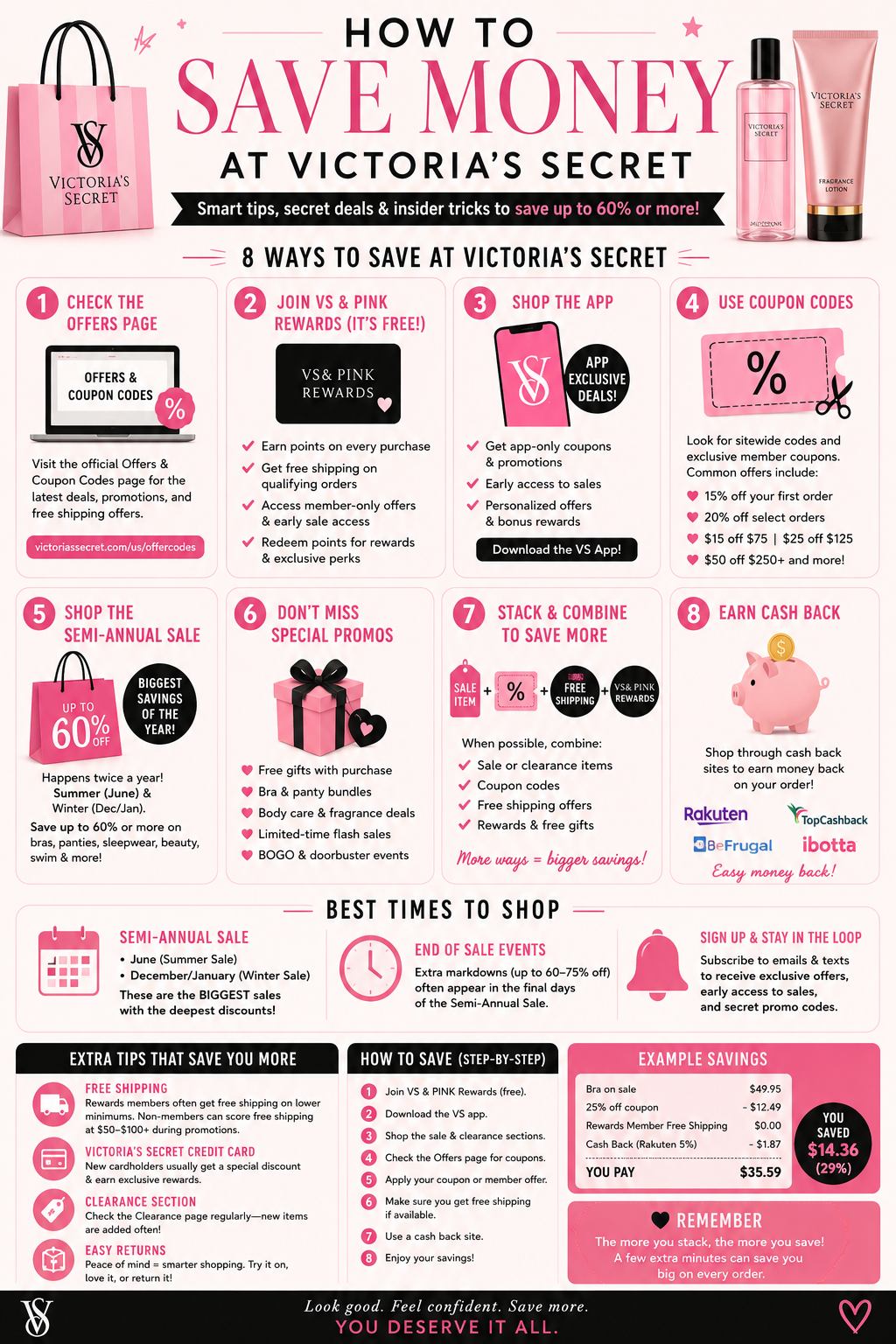
Victoria’s Secret is known for its bras, lingerie, beauty products, sleepwear, and PINK collections, but paying full price is rarely necessary. Between coupon codes, app-exclusive promotions, rewards programs, cash-back opportunities, and major seasonal sales, savvy shoppers can often save 20% to 60% or more on their purchases.
The first place every shopper should check before buying is Victoria’s Secret’s official Offers & Coupon Codes page. The company regularly posts active promotions, member-only discounts, free shipping offers, and seasonal sales. VS & PINK Rewards members currently receive perks such as free shipping on qualifying orders and access to exclusive offers that are not always available to non-members.
One of the easiest ways to unlock additional savings is by downloading the Victoria’s Secret app. The app frequently features member-only promotions, bonus rewards events, early access to new collections, and app-exclusive coupons. Some promotions appear only in the app and are unavailable on the regular website. Rewards members can also receive personalized offers based on their shopping history.
Current deal trackers show some of the most common Victoria’s Secret promotions include 15% off first purchases, 20% off select orders, free gifts with qualifying purchases, and tiered discounts such as $15 off $75, $25 off $125, or $50 off larger orders. Free shipping promotions frequently appear as well, especially for rewards members.
If you’re shopping for bras, panties, and beauty products, watch for Victoria’s Secret’s bundle promotions. Popular offers often include bra bundles, panty multipacks, body care specials, and fragrance deals. Recent promotions have included offers such as 2 bras for a fixed price, discounted bralettes with panty purchases, and significant markdowns on body care collections.
The biggest savings of the year usually arrive during the Semi-Annual Sale. This event typically occurs twice per year, once in the summer and again after the holiday season. During these sales, shoppers can find discounts of up to 60% or more on bras, sleepwear, beauty products, swimwear, and clearance merchandise. Inventory changes quickly, and the deepest discounts are often found on seasonal colors and discontinued styles.
Another often-overlooked savings opportunity is the VS & PINK Rewards program. Members earn points on purchases that can later be redeemed for rewards. Throughout the year, Victoria’s Secret runs special Member Days events that provide bonus rewards opportunities, exclusive coupons, and future purchase credits. Recent member promotions have included earning future discounts after reaching spending thresholds.
Many experienced shoppers combine multiple savings strategies. A typical high-value purchase might involve shopping clearance items during a sale, applying a coupon code, qualifying for a free gift promotion, using a rewards benefit, and earning cash back through a rebate service. While not every promotion can be stacked together, combining several offers can significantly reduce the final price.
Cash-back services can add another layer of savings. Platforms such as Rakuten frequently offer cash-back rewards on Victoria’s Secret purchases. These rebates can be earned on top of coupon codes and promotional sales, effectively lowering the total cost even further.
Before placing an order, it is worth checking the shipping threshold carefully. Rewards members often receive more favorable shipping offers than non-members, and a free shipping promotion can sometimes save more money than a larger percentage-off coupon once shipping costs are included. Some shoppers have noted that applying certain coupons may affect free shipping eligibility, making it important to review the final checkout total before completing a purchase.
For shoppers looking to maximize savings, the best strategy is simple: join VS & PINK Rewards, install the app, shop during the Semi-Annual Sale, check the official offers page before checkout, and stack rewards or cash-back opportunities whenever possible. Following these steps can often reduce the cost of a Victoria’s Secret order by 30% to 60% compared to paying full retail price.
Whether you’re shopping for lingerie, beauty products, pajamas, activewear, or gifts, a little planning can go a long way. Victoria’s Secret runs promotions year-round, and informed shoppers rarely need to pay full price.
Backstage.com has been around for decades as the go-to platform for actors, performers, and now content creators looking for real opportunities in film, theater, commercials, and increasingly, user-generated content (UGC). What started as a casting resource for traditional entertainment has evolved into a goldmine for UGC creators who want to earn money creating authentic, short-form videos for brands without the hassle of endless cold DMs or emails. I discovered it a while back and it quickly became one of my main sources for consistent gigs that pay between $100 and $200 each.
Learn more about Backstage & special introductory savings
Backstage.com is separate from my product review videos. My product review videos are unbiased reviews of products. Backstage allows me the opportunity to create UGC for business marketing campaigns. It’s for companies to use in their marketing material, I do not post these videos on my pages or channels.
UGC is basically content that feels like a real person—think honest product reviews, unboxing videos, or lifestyle clips shot on your phone that brands use for social media ads. Brands love it because it builds trust far better than polished commercials. According to industry stats, a huge percentage of marketers say UGC outperforms traditional content, which explains why there’s growing demand on platforms like Backstage. The site now has dedicated sections for UGC jobs, with hundreds of active casting calls at any time for creators of all backgrounds and niches.
When I first signed up, I treated my Backstage profile like a professional portfolio. I uploaded a mix of headshots, lifestyle photos, and short UGC-style video samples showing me talking naturally to the camera about products I actually use. The key is authenticity—brands want creators who can hook viewers in the first few seconds, demonstrate the product in real-life settings, and deliver variations of scripts or hooks.
My first gig came within a couple months. Payment was around $150. The brand provided a brief, I filmed a few options, and they paid promptly. You just follow the brief and submit the content to the company once it’s finished. I wouldn’t say things have “snowballed” on the platform, but I have booked 6 reviews in 2 years. This is not enough to make a career of creating content for companies, but it has been a way to build a portfolio I can show to other companies. Hopefully things pick up in 2026, want to produce more for Backstage, consistently.
What I appreciate most is the legitimacy. Backstage vets postings to reduce scams, though it’s always smart to communicate through their platform initially and watch for red flags like requests for upfront payments. Backstage can now pay creators directly through the platform which is nice.
To succeed, consistency matters. I check the site regularly, filter for UGC or content creator roles, and submit tailored applications with my best samples. Building a strong profile with real video examples is non-negotiable—brands scroll through dozens of applicants and want proof you can deliver professional-yet-relatable content. Tips from successful creators include creating sample videos for products you already own, focusing on strong hooks, and using natural lighting and framing that matches how people actually consume content on TikTok or Instagram.
Backstage isn’t a get-rich-quick scheme. You still need to put in the work applying, filming high-quality clips on deadline, and delivering what brands ask for. But compared to hunting brands directly, it centralizes opportunities from verified posters who are ready to pay. Many creators, including me, have turned it into a reliable stream of gigs that also boost their personal social media presence and lead to repeat clients. I find if you go on their daily and treat applying for gigs as a job you will eventually book something. You must be 100% dedicated.
If you’re serious about UGC and want paid work without the guesswork, Backstage.com is worth exploring. Set up a solid profile, start applying strategically, and you might find yourself landing that first gig sooner than expected—just like I did. It’s been a game-changer for turning my camera and personality into multiple paying projects.
Grocery shopping feels expensive now no matter where you go. People walk into the store for “just a few things” and somehow leave spending over a hundred dollars without even trying. That’s exactly why more shoppers are turning to digital grocery coupons again.
For years, couponing had this reputation of being something only extreme bargain hunters did with giant binders full of paper coupons. Now it’s completely different. Most grocery savings have moved onto apps, store loyalty programs, and digital accounts instead.
And honestly, stores are pushing hard for people to use them.
A lot of supermarkets now hide their best deals inside their apps. You’ll see regular shelf prices in the store, but members using the app or rewards account suddenly get extra discounts, personalized offers, fuel points, or digital-only sales. According to Consumer Reports, many shoppers can stack digital coupons with other promotions to save even more during checkout.
That’s where people are starting to notice real savings.
One example from the report showed Breyers ice cream listed at $5.99, but shoppers using store rewards got two for $8. Then an additional digital coupon knocked another dollar off the deal. It might not sound life-changing on one item, but over weeks and months those discounts add up fast.
That’s really the secret behind modern couponing now. It’s not usually about getting groceries for free like those old reality TV coupon shows. It’s more about stacking small savings consistently.
Apps from stores like Food Lion, Harris Teeter, Publix, and Lowes Foods now constantly push digital offers directly to shoppers. Weekly grocery ads also include app-exclusive deals on everything from produce and frozen meals to snacks and household items.
Some stores even tie coupons into gas rewards programs, which people love because gas prices still hurt too.
The funny thing is most shoppers don’t even think of themselves as “couponers” anymore. Clipping digital offers inside an app feels normal now. It takes maybe thirty seconds while standing in line or scrolling at home before a grocery run.
Of course, there’s a tradeoff.
To unlock these savings, most grocery chains require shoppers to sign up for loyalty programs and use store accounts. Consumer Reports noted that retailers may collect shopping data from those accounts, including buying habits and preferences. Some experts have raised concerns about privacy and how stores use that information for advertising and pricing strategies.
Still, most shoppers seem willing to accept that exchange if it means lowering their grocery bill.
And honestly, people are getting more strategic about grocery shopping now because they almost have to. Families are checking weekly ads again, combining digital coupons with store sales, and using cashback apps alongside loyalty programs just to stretch budgets a little further.
The old days of sitting at the kitchen table clipping newspaper coupons might be fading away, but coupon culture itself definitely isn’t disappearing. It just moved onto smartphones.
At this point, digital grocery coupons have become part of everyday shopping for millions of people trying to fight rising food prices without completely changing how they eat. And with stores continuing to push app-based discounts harder every year, that trend probably isn’t slowing down anytime soon.
Saving money online used to mean digging through random coupon websites that looked like they hadn’t been updated since 2007. Half the promo codes didn’t work, the other half expired years ago, and somehow every website claimed they had “exclusive deals” nobody else had.
Now people mostly let apps do the work for them.
Coupon and cashback apps have become insanely popular over the last few years because online shopping is basically part of everyday life now. Whether someone is buying groceries, electronics, clothes, or completely unnecessary stuff at 2 AM, everybody wants to feel like they got a better deal than the listed price.
That’s where these apps come in.
Honey is probably still the most recognizable name in the coupon world. Even people who never used it probably know about it because of how aggressively it was advertised on YouTube for years. The app automatically tests coupon codes during checkout, which sounds simple, but honestly that convenience is why millions of people installed it.
People like things that save money without requiring effort. That’s basically Honey’s entire appeal.
Rakuten is another one that keeps showing up everywhere. Instead of focusing mostly on coupon codes, Rakuten pushes cashback rewards. You shop through participating stores and get a percentage of your purchase back later. It’s slower than instant discounts, but frequent shoppers end up liking the “getting paid to shop” feeling.
Then there’s Capital One Shopping, which has grown pretty quickly lately. A lot of people compare it directly to Honey because both work as browser extensions, but Capital One Shopping focuses more on price comparisons and finding lower listings across different retailers.
Some users actually prefer it because it feels less cluttered.
RetailMeNot is kind of the old-school survivor of internet coupon culture. Before browser extensions took over everything, people were already checking RetailMeNot for promo codes before buying stuff online. It still sticks around because sometimes simple databases of discount codes are still useful.
Honestly though, coupon apps aren’t magic.
Sometimes they find huge discounts. Other times they save you thirty-seven cents and act like they changed your life. Experiences vary a lot depending on what stores people use and how often they shop online.
There’s also the privacy side of things that more users have started paying attention to. Since these apps track shopping activity and browser behavior to some extent, people have become more cautious about which extensions they install. A few coupon apps have even faced criticism over affiliate commissions and how they make money behind the scenes.
Still, most shoppers don’t really care as long as the discounts work.
That’s probably the biggest reason coupon apps continue growing. Prices online keep going up, people are tired of overpaying, and nobody enjoys manually searching for promo codes anymore. Browser extensions made the process automatic, and once shoppers got used to that convenience, there was no going back.
At this point, coupon apps are almost part of online shopping culture itself. Some people install multiple extensions at once hoping one of them finds a better deal than the others. It’s basically digital bargain hunting now.
And honestly? In an economy where everything feels expensive lately, people will absolutely keep chasing those little checkout discounts whenever they can.
If you make videos for TikTok, YouTube Shorts, Instagram Reels, ads, product promos, or even basic business content, you’ve probably heard people hype up CapCut like it’s some kind of magic editing app. And honestly? A lot of that hype is deserved. But there’s also a mountain of misleading reviews pretending CapCut is either a flawless Adobe killer or complete trash. Reality sits somewhere in the middle.
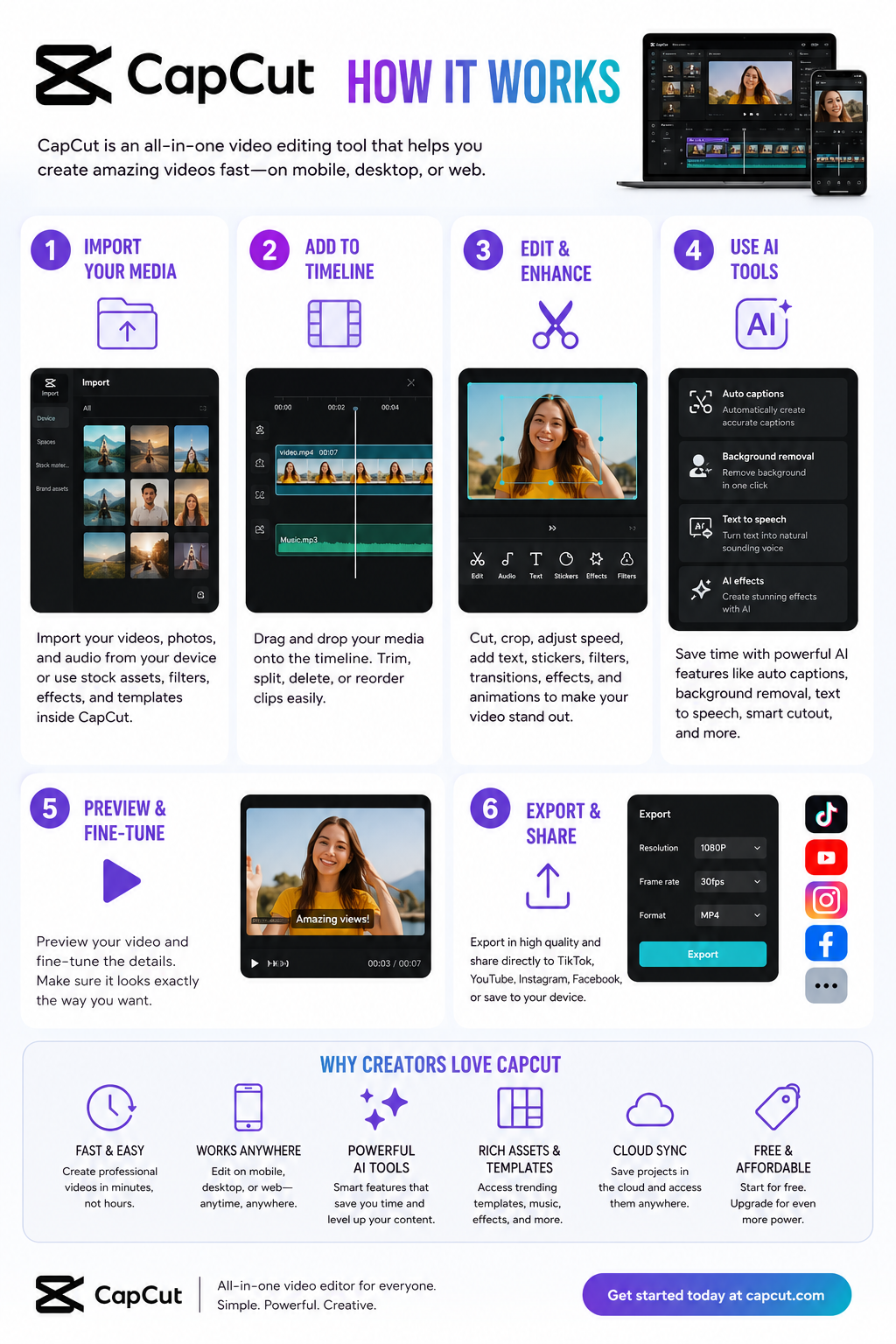
CapCut became huge because it solved a problem most video editors ignored for years: people wanted fast content, not film school. Traditional editors like Adobe Premiere Pro and DaVinci Resolve are incredibly powerful, but they can feel painfully slow for social media creators. CapCut flipped the experience entirely. Instead of building around timelines first, it built around speed, templates, captions, vertical video, trends, and AI automation. That changed everything.
The biggest reason CapCut exploded is simple: it removes friction. You can record a clip, auto-caption it, add transitions, background music, motion effects, zoom cuts, and export something that looks professionally edited in minutes. For short-form creators, that matters more than advanced cinema-grade controls. Reddit creators constantly mention that CapCut’s workflow feels dramatically faster for social media content than older professional editors.
Where CapCut really shines is automation. Auto-captions alone save creators hours every week. The AI subtitle system is surprisingly accurate for normal speech and automatically styles captions for social platforms. Background removal is another standout feature. Instead of manually masking subjects frame-by-frame like older editing software required, CapCut lets beginners create polished edits with one click.
The mobile experience is arguably the best part of the entire platform. Most mobile editors still feel like stripped-down desktop software. CapCut doesn’t. It was designed around phones from the start, and that matters. The controls feel intuitive, templates load fast, and exporting vertical videos for social media is dead simple. For creators who mainly work from phones, CapCut honestly feels years ahead of many competitors.
The desktop version has improved massively too. A lot of people still think CapCut is “just a mobile app,” but that’s outdated thinking. The desktop editor now includes multi-track editing, AI tools, motion tracking, keyframes, effects libraries, templates, voice generation, and advanced export options.
Now let’s talk about the part most fake reviews avoid: the downsides.
CapCut is not a true replacement for high-end professional editing software if you work on long-form cinematic projects, documentaries, feature production, advanced audio mastering, or heavy color grading. It simply isn’t built for that level of complexity. You can absolutely create professional-looking content in CapCut, but there’s a difference between “professional-looking social content” and full-scale production workflows.
Another issue is platform dependence. CapCut is deeply tied to the short-form social media ecosystem, especially TikTok and vertical video culture. That’s great if your business depends on viral content. It’s less ideal if you want timeless editing workflows that aren’t built around trends.
The pricing situation is also confusing now. CapCut used to feel ridiculously generous for free users. Today, more AI features, effects, templates, and advanced exports are moving behind paid plans. The free version is still strong, but some users feel frustrated because features they relied on became Pro-only over time.
That said, compared to Adobe pricing, CapCut Pro is still relatively affordable for most creators. Many Reddit users openly say they switched because the value proposition made more sense for social media work.
There’s another issue that deserves real attention: privacy and ownership concerns.
CapCut’s parent company is ByteDance, the same company behind TikTok. In recent years, critics raised concerns about terms of service language related to uploaded content and usage rights. Some creators became uncomfortable with how broad the licensing terms appeared.
For casual creators making memes or short clips, this probably won’t matter much. But if you work with sensitive client projects, unreleased campaigns, commercial footage, or intellectual property, you should absolutely read the terms yourself before uploading valuable assets to cloud-based AI tools. This is one of those things most influencer reviews conveniently skip over.
Another thing worth mentioning is how much CapCut changed the industry itself. Instagram literally launched a competing editor called Edits because CapCut became such a dominant creator tool. That alone tells you how influential the platform became.
For beginners, CapCut is probably one of the best editing tools available right now. The learning curve is low, results come fast, and the free version is powerful enough to start building content immediately. Most new creators do not need Premiere Pro on day one. They need consistency, speed, and motivation. CapCut helps with all three.
For businesses, CapCut can be a surprisingly powerful marketing tool. Small businesses constantly struggle with content creation because traditional editing is time-consuming and expensive. CapCut’s templates, auto-captions, AI tools, and quick editing workflows dramatically reduce production time for ads, product showcases, tutorials, testimonials, and social campaigns.
For advanced editors, CapCut works best as a companion tool rather than a full replacement. Many professionals actually use both. They’ll cut quick social clips in CapCut while keeping larger productions inside Premiere or DaVinci.
So is CapCut worth it?
Yes — for most creators, absolutely.
But not because it’s the “best editor ever.” It’s worth it because it understands modern content better than most traditional editing software. It prioritizes speed over perfection, automation over complexity, and publishing over polishing endlessly. That’s exactly what most internet creators need right now.
If you’re a beginner creator, small business owner, affiliate marketer, YouTuber, TikTok creator, coach, ecommerce brand, or someone trying to produce content consistently without a massive learning curve, CapCut is probably one of the smartest tools you can start with.
If you’re editing films, documentaries, broadcast work, or highly technical productions, you’ll probably outgrow it eventually.
But for the modern creator economy? CapCut nailed the assignment better than almost anyone else.
Is InVideo AI Actually Worth It? A No-BS Review After Digging Through Real User Feedback
If you watch YouTube videos about InVideo AI, you’d think it’s some magical “type one sentence, make viral videos instantly” machine. Yeah… not exactly.
After digging through Reddit threads, verified review sites, tutorials, pricing pages, and user complaints, the honest answer is this: InVideo AI is legitimately useful for pumping out fast content at scale, especially faceless social videos, affiliate clips, YouTube Shorts, TikToks, and quick marketing content. But if you expect cinematic quality, deep editing control, or truly unique videos, you’re probably going to end up disappointed.
It’s one of those tools that feels amazing for the right person and incredibly frustrating for the wrong one.
The biggest strength of InVideo AI is speed. You feed it a prompt, script, blog post, or idea, and it automatically builds scenes, stock footage, subtitles, transitions, music, pacing, AI voiceovers, and formatting for social platforms. For beginners, that’s honestly pretty impressive. A lot of users say they created their first usable YouTube or TikTok videos with it because the learning curve is much easier compared to professional editing software like Adobe Premiere Pro or DaVinci Resolve.
That’s really who this tool is for: marketers, affiliate sites, agencies, faceless YouTube channels, small businesses, and people who simply hate editing. If your goal is “make decent videos fast,” InVideo AI actually does a solid job.
Some marketers are using it to mass produce review videos, blog-to-video content, and social clips because it compresses production time dramatically. And honestly, that makes sense. The software is built around efficiency more than creativity.
But here’s where the hype starts falling apart a little. A huge number of users mention the same issue: the videos eventually start looking generic. Not always bad. Just very obviously AI generated.
You start noticing repetitive stock footage, predictable pacing, robotic storytelling structure, dramatic zoom effects, emotionally empty narration, and that weird “template energy” you see all over TikTok and YouTube now. After a while, you can almost instantly tell when a video came from one of these AI generators.
That’s the tradeoff. Tools like this optimize for speed, not originality.
If you’re building a real brand with personality and authenticity, you’ll probably outgrow InVideo AI pretty quickly. The more polished and human you want your videos to feel, the more manual editing you end up doing anyway.
The AI voiceovers are better than expected though. Compared to older AI video generators from a few years ago, the narration quality has improved a lot. Some voices sound surprisingly natural, especially on the higher-tier plans. Still, it’s not perfect. You’ll occasionally get awkward pauses, strange pronunciations, weird emotional emphasis, or robotic tone shifts that instantly remind viewers they’re listening to AI.
The free version is also not nearly as generous as some creators make it sound. Technically there is a free plan, but it comes with watermarks, export limits, credit restrictions, and lower quality output. It’s useful for testing the platform, but if you actually want professional-looking exports, you’ll almost certainly need a paid subscription.
And honestly, the credit system seems to be one of the biggest frustrations users complain about. Several reviews mention burning credits on video generations that didn’t turn out usable. That’s one of the hidden annoyances with AI creation tools in general right now: you’re often paying for attempts instead of guaranteed quality.
Reddit’s opinion on InVideo AI is mixed as hell. Some people genuinely love it because it helped them launch channels faster and stay consistent with content creation. Others absolutely hate it and complain about billing issues, generic outputs, poor customer support, or overhyped marketing.
That split actually tells you everything you need to know. Your experience with InVideo AI depends almost entirely on your expectations.
If you expect AI to completely replace real editors and magically create viral content with one prompt, you’ll probably hate it. If you treat it like a fast first-draft machine that saves time and handles repetitive editing work, you’ll probably find it useful.
Where InVideo AI makes the most sense is faceless YouTube channels, affiliate marketing content, local business promos, blog-to-video repurposing, quick social content, PPC companion videos, and high-volume agency work where speed matters more than artistic perfection.
Where it makes less sense is premium storytelling, cinematic content, emotional documentaries, luxury branding, creative filmmaking, or anything where uniqueness and human personality are the main selling point.
There’s also a growing AI fatigue online right now. Audiences are getting better at spotting low-effort generated content, and people can absolutely feel when videos have no personality or soul behind them. That matters more than a lot of AI marketers want to admit.
Some of the biggest competitors to InVideo AI are starting to catch up fast, and in some cases they actually do certain things better depending on what kind of creator you are.
Pictory is probably one of the closest direct competitors. It’s heavily focused on turning blog posts and scripts into social videos quickly, which makes it popular with affiliate marketers and SEO publishers.
Synthesia is more business-focused and known for realistic AI avatars. It’s used a lot for training videos, corporate explainers, and presentations rather than viral social content.
HeyGen exploded in popularity because of its AI avatars, face swapping, multilingual voice cloning, and realistic presenter videos. A lot of creators think it feels more modern and polished than older AI video tools.
Runway ML is more advanced and creative-focused. It’s closer to an AI filmmaking platform than a beginner drag-and-drop editor. The learning curve is higher, but the creative potential is much bigger.
Descript is incredibly popular with podcasters and YouTubers because it lets you edit video almost like editing a Word document. Its AI voice cloning and transcription tools are honestly some of the best in the space.
VEED.io has become a favorite for fast social media editing, captions, clips, and browser-based editing. Many creators feel its interface is cleaner and easier to use than InVideo.
Canva Video is surprisingly strong now. It’s not as AI-heavy as some competitors, but for marketers already using Canva, the workflow can feel smoother and more flexible.
CapCut is dominating short-form content creation right now, especially for TikTok creators. The mobile editing experience and built-in effects are honestly hard to beat for free or low-cost editing.
Lumen5 focuses heavily on transforming articles and written content into marketing videos. It’s very similar to InVideo in some ways but leans more toward branded business content.
Animoto has been around for years and is still popular with small businesses that need simple slideshow-style promo videos without learning complicated editing software.
What’s interesting is that the AI video space is moving insanely fast right now. A tool that feels cutting-edge today can honestly feel outdated six months later. That’s why a lot of creators bounce between multiple platforms instead of staying loyal to just one.
InVideo AI still competes well because it balances speed, automation, templates, and beginner friendliness pretty effectively. But it’s definitely no longer the only serious player in the AI video game.
So is InVideo AI worth it? Honestly, yes for some people and absolutely not for others.
If you value speed over perfection, need lots of content quickly, run faceless channels, or hate editing, it can genuinely save you time and money. If you care deeply about originality, premium visuals, emotional storytelling, or building a unique creative brand, you’ll probably end up frustrated and eventually move toward more advanced workflows.
The simplest way to describe InVideo AI is this: it’s basically Canva for AI video production. Fast, convenient, occasionally impressive, but sometimes painfully generic.
For marketers and content grinders, it can absolutely be worth the money. For creatives chasing originality, probably not.
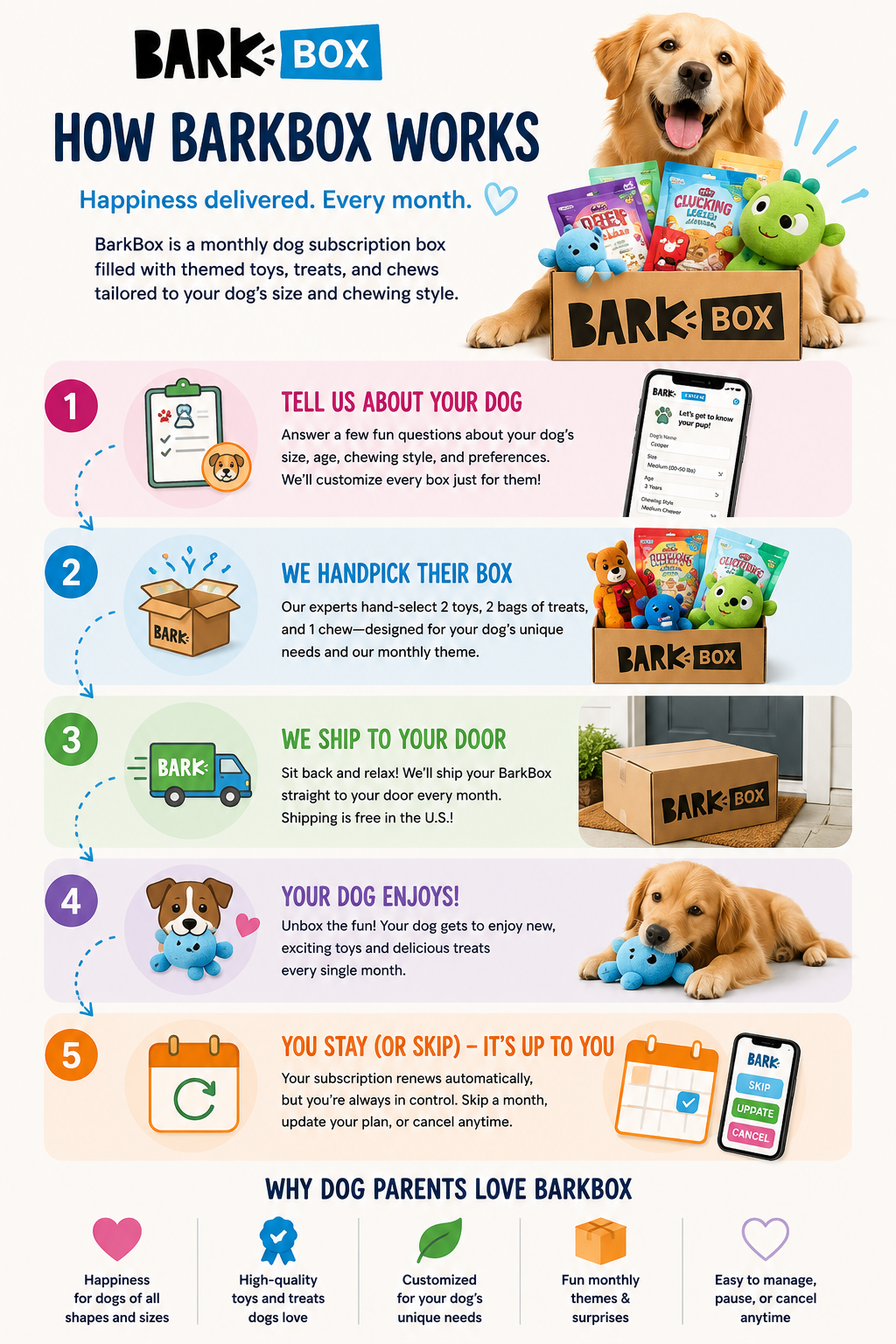
If you own a dog that destroys toys in five minutes, gets bored constantly, or somehow treats every package delivery like it was personally sent to them, you’ve probably looked into BarkBox. The idea behind BarkBox is simple. Every month, subscribers receive a themed box filled with dog toys, treats, and chews customized to their dog’s size and chewing habits. There’s also a tougher version called Super Chewer designed for dogs that absolutely demolish regular toys.
But the real question most dog owners ask before subscribing is simple: Is BarkBox actually worth the money?
After digging through customer experiences, Reddit discussions, reviews, pricing comparisons, and long-term subscriber feedback, the answer is yes for the right type of dog owner. But it’s definitely not perfect for everyone.
One of the biggest reasons BarkBox has stayed popular is because the toys are genuinely more creative than what most people buy at pet stores. Instead of generic squeaky toys, BarkBox leans heavily into funny monthly themes with unique characters, weird designs, and interactive concepts. For a lot of dogs, the novelty matters. Dogs get bored just like humans do, especially high-energy breeds. Many subscribers mention their dogs stay interested in BarkBox toys longer simply because new toys arrive every month.
Another reason people stick with BarkBox is convenience. A surprising number of dog owners eventually realize they already spend BarkBox-level money making random pet store purchases throughout the month anyway. One trip to Target or Petco turns into another rope toy, another bag of treats, another boredom purchase, and suddenly the subscription doesn’t seem that expensive anymore. Several long-term subscribers even mentioned BarkBox reduced their impulse spending because they stopped buying random toys between shipments.
For owners of aggressive chewers, Super Chewer tends to get much better reviews than the standard BarkBox. The toys are designed with stronger rubber, tougher materials, and heavier construction. Many owners of pit bulls, huskies, shepherds, and other destructive breeds say Super Chewer toys survive significantly longer than standard plush toys from pet stores. That said, no dog toy is truly indestructible. Some dogs can still destroy Super Chewer toys surprisingly fast, so expectations matter. If your dog can destroy a Kong toy in one sitting, BarkBox probably won’t perform miracles.
One thing BarkBox does particularly well compared to many subscription services is personalization. Boxes are customized based on dog size, allergies, chewing behavior, and toy preferences. That customization matters because dog owners tend to become extremely picky over time about what treats and toys actually work for their dog. BarkBox reportedly creates massive numbers of unique box combinations each month, and many subscribers appreciate that the company attempts to tailor the experience instead of sending identical boxes to everyone.
Still, BarkBox definitely has weaknesses. One complaint that shows up repeatedly in newer reviews is inconsistency in toy quality. Some longtime subscribers believe the durability and creativity of the toys have declined compared to earlier years. Others mention certain months feel amazing while other boxes feel repetitive or underwhelming. This inconsistency doesn’t necessarily mean BarkBox is bad, but it does mean the experience can vary month to month.
Another funny but very real downside is toy overload. Many subscribers eventually accumulate mountains of dog toys. Owners often joke that their dogs have enough toys to last for years. If your dog isn’t particularly destructive, the toys pile up surprisingly fast. Some people eventually pause or cancel simply because their home starts looking like a small dog toy warehouse.
The subscription model itself can also frustrate some users. BarkBox heavily encourages longer-term plans because the monthly price becomes cheaper with six- or twelve-month commitments. Some customers dislike the auto-renewal structure, upsells, promotional emails, or cancellation process. Customer support reviews online are mixed. Some people praise BarkBox for replacing damaged toys quickly, while others complain about billing frustrations or communication issues.
So who is BarkBox actually best for? Honestly, it works best for busy dog owners with energetic dogs who already spend money regularly on treats and toys. If your dog gets bored easily, destroys toys constantly, or genuinely gets excited by new things, BarkBox can feel surprisingly worthwhile. Many dog owners also enjoy the emotional side of the subscription. Dogs often recognize the box itself when it arrives, and for some families, the monthly unboxing becomes part of their routine.
On the other hand, BarkBox may not make sense for older low-energy dogs, dogs with highly restrictive diets, or owners who only want ultra-durable practical toys. If your dog has been perfectly happy with one tennis ball and an old sock for the last five years, a subscription box may be unnecessary.
The biggest debate around BarkBox usually comes down to value. Is it better than simply buying toys yourself? For some people, yes. Especially if they already make frequent impulse purchases for their pets. But disciplined dog owners who already know exactly which toys and treats work for their dog can probably save money buying selectively instead of subscribing monthly.
The choice between regular BarkBox and Super Chewer is also important. Regular BarkBox focuses more on fun plush toys and themed experiences, while Super Chewer focuses more heavily on durability and practical chewing. For dogs that routinely destroy toys, Super Chewer is almost always the better option.
Overall, BarkBox succeeds because it sells more than just dog toys. It sells convenience, novelty, entertainment, and emotional enjoyment for both dogs and owners. For the right household, that value is absolutely real. It’s not perfect, and some toys won’t survive as long as you hope, but compared to many subscription boxes available today, BarkBox remains one of the more genuinely enjoyable and useful services for dog owners.
For decades, cars represented freedom. You got behind the wheel, rolled down the windows, and went wherever you wanted without much thought about who — or what — was watching. But that relationship between drivers and vehicles is rapidly changing, and many experts believe the next generation of cars may become some of the most sophisticated surveillance devices Americans own.
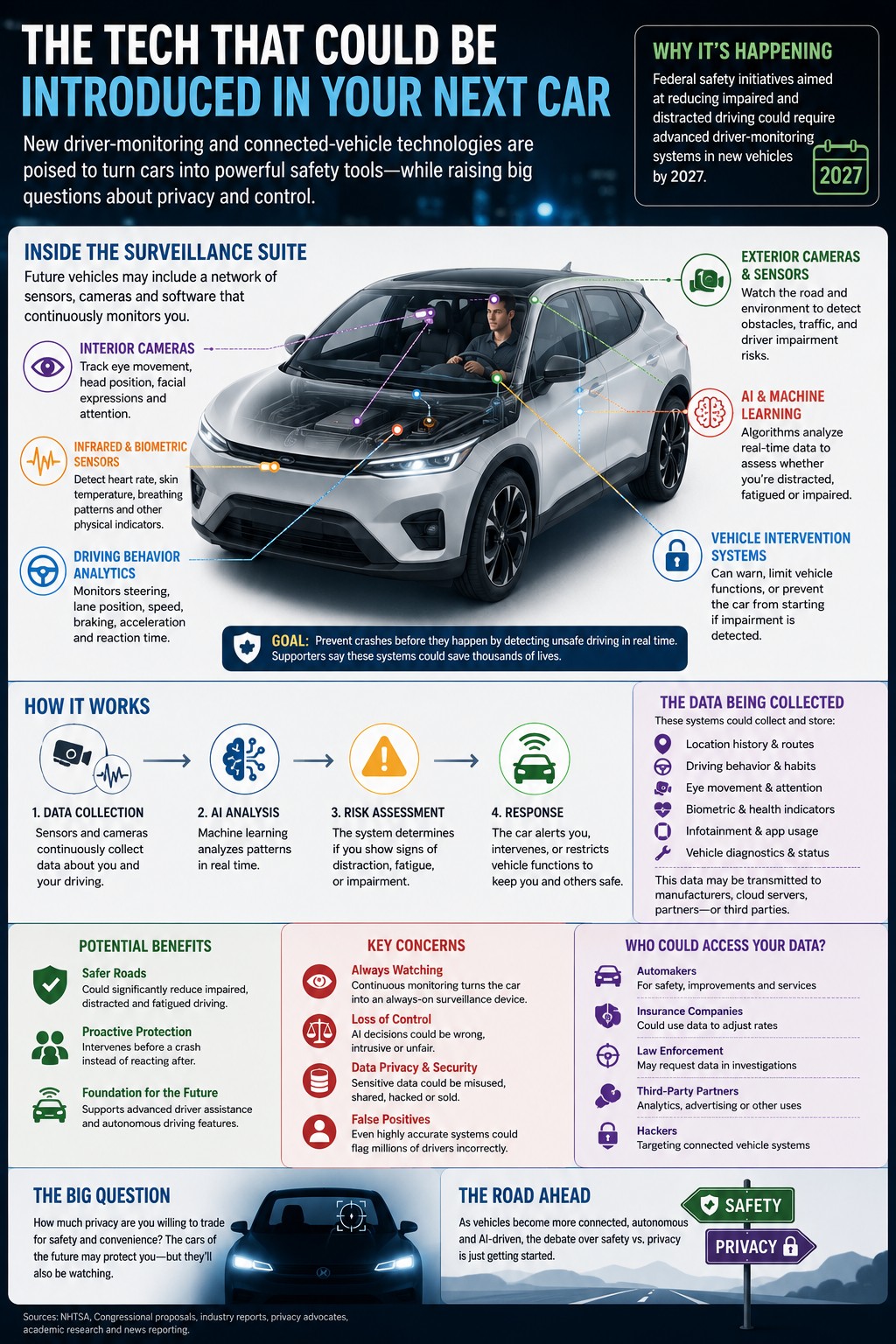
A growing national debate has erupted around new driver-monitoring technologies expected to become standard in future vehicles. Federal safety initiatives tied to impaired-driving prevention could require automakers to install advanced systems capable of monitoring driver behavior in real time by 2027. These systems use cameras, infrared sensors, artificial intelligence, and biometric tracking to analyze whether a driver appears distracted, fatigued, intoxicated, or otherwise impaired.
Supporters argue the technology could save thousands of lives. Drunk and distracted driving remain major causes of fatal crashes across the United States, and safety advocates say proactive monitoring systems could prevent accidents before they happen. Instead of reacting after dangerous driving occurs, future vehicles may intervene immediately by issuing warnings, limiting vehicle functions, or even preventing a car from starting altogether if impairment is detected.
But critics say the technology crosses a line that Americans may not fully understand yet.
Unlike traditional safety systems such as airbags or anti-lock brakes, these new systems continuously observe the driver. Cameras can track eye movement, head position, attention span, blinking patterns, and steering behavior. Some proposed technologies could eventually monitor heart rate, breathing patterns, or other physical indicators. Privacy advocates argue this transforms the car from a transportation tool into an always-on monitoring device.
One of the biggest fears centers around control. If artificial intelligence systems determine whether someone is “fit” to drive, critics worry about false positives and machine-made decisions interfering with everyday life. Something as simple as driving while tired after work, looking away briefly, or appearing stressed could potentially trigger warnings or restrictions depending on how sensitive the system becomes.
Even federal safety officials have acknowledged the challenge. According to reporting on the issue, transportation regulators noted that even systems with extremely high accuracy rates could still generate millions of false positives annually simply because of the enormous number of drivers on American roads every day.
Beyond the immediate driving experience, another question keeps surfacing: where does all the data go?
Modern vehicles already collect huge amounts of information, including location history, driving speed, braking habits, navigation routes, maintenance diagnostics, and infotainment usage. Many connected vehicles upload portions of that information to cloud-based systems operated by manufacturers. New driver-monitoring systems would dramatically increase the amount of behavioral data collected inside vehicles.
That has sparked fears about how the data could eventually be used. Privacy groups worry insurers could use driver-behavior data to adjust rates. Law enforcement agencies could potentially request access to vehicle records during investigations. Hackers may target connected systems storing sensitive information. Meanwhile, cybersecurity researchers have already demonstrated how location histories and other vehicle data can sometimes be extracted from connected cars.
The concerns are not entirely theoretical anymore. Researchers examining connected vehicle systems have warned that some modern cars already broadcast signals capable of revealing location information, while newer electric vehicles increasingly function more like rolling computers than traditional automobiles.
Automakers, however, argue that software-driven vehicles are the future. Advanced driver assistance systems, automatic emergency braking, adaptive cruise control, and lane-centering technologies all rely on increasing amounts of data and automation. Industry leaders believe AI-powered systems will eventually make roads dramatically safer while improving navigation, maintenance, and autonomous driving capabilities.
Some researchers believe society may already be becoming desensitized to automotive surveillance. A recent academic study examining autonomous vehicle users found many drivers viewed in-car monitoring as simply another extension of the broader digital surveillance already normalized through smartphones, apps, smart homes, and online platforms.
Still, the emotional reaction many drivers have toward surveillance inside vehicles feels different because cars occupy such a personal space in everyday life. For millions of Americans, driving represents privacy, independence, and personal control. The idea that a car may constantly evaluate its owner’s behavior — and potentially override human decisions — creates discomfort that goes beyond ordinary technology debates.
At the center of the issue is a difficult balancing act between safety and freedom. Few people oppose reducing drunk driving deaths. But many remain uneasy about handing that responsibility to software systems capable of watching, recording, analyzing, and reacting to human behavior every time someone gets behind the wheel.
As vehicles become more connected, autonomous, and AI-driven, the future of driving may involve more than horsepower and fuel economy. It may also force Americans to decide how much privacy they are willing to trade for convenience and safety.
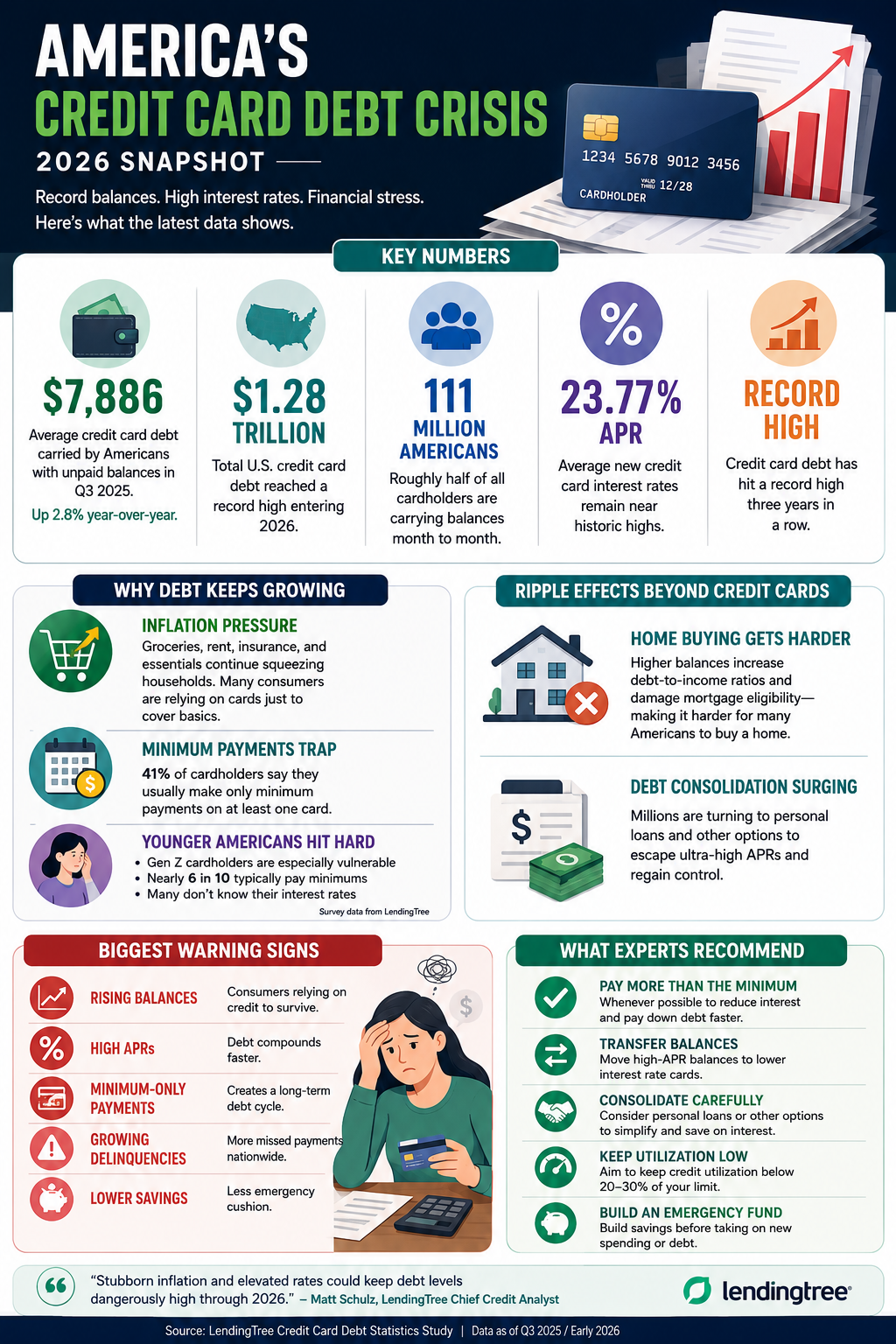
U.S. credit card debt has reached record highs in 2026. Explore the latest statistics, rising interest rates, inflation pressures, and what Americans can do to regain financial control.
Despite strong consumer spending, many Americans are increasingly relying on credit cards to manage everyday expenses as inflation continues to strain household budgets. High interest rates and rising living costs have created a difficult financial environment where balances are growing faster than many borrowers can repay them. Experts warn that if economic pressures remain elevated through 2026, more households could face long-term debt cycles, lower credit scores, and reduced access to major financial milestones like homeownership and retirement savings.
Need help with managing debt visit: https://www.moneymaxaccount.com/moneymaxdemo/