
AI
Budgeting has a reputation for being difficult, time-consuming, and restrictive. For many people, it means sorting through bank statements, tracking every purchase, and wondering why there’s never as much money left at the end of the month as expected.
Fortunately, artificial intelligence is changing that.
AI can analyze your spending, organize expenses into categories, identify spending habits, recommend realistic savings goals, and even act as a personal budgeting coach. While it won’t replace a financial advisor or make financial decisions for you, it can take much of the frustration out of creating and maintaining a budget.
If you’ve never budgeted before—or you’ve tried and failed—AI can make the process much easier.
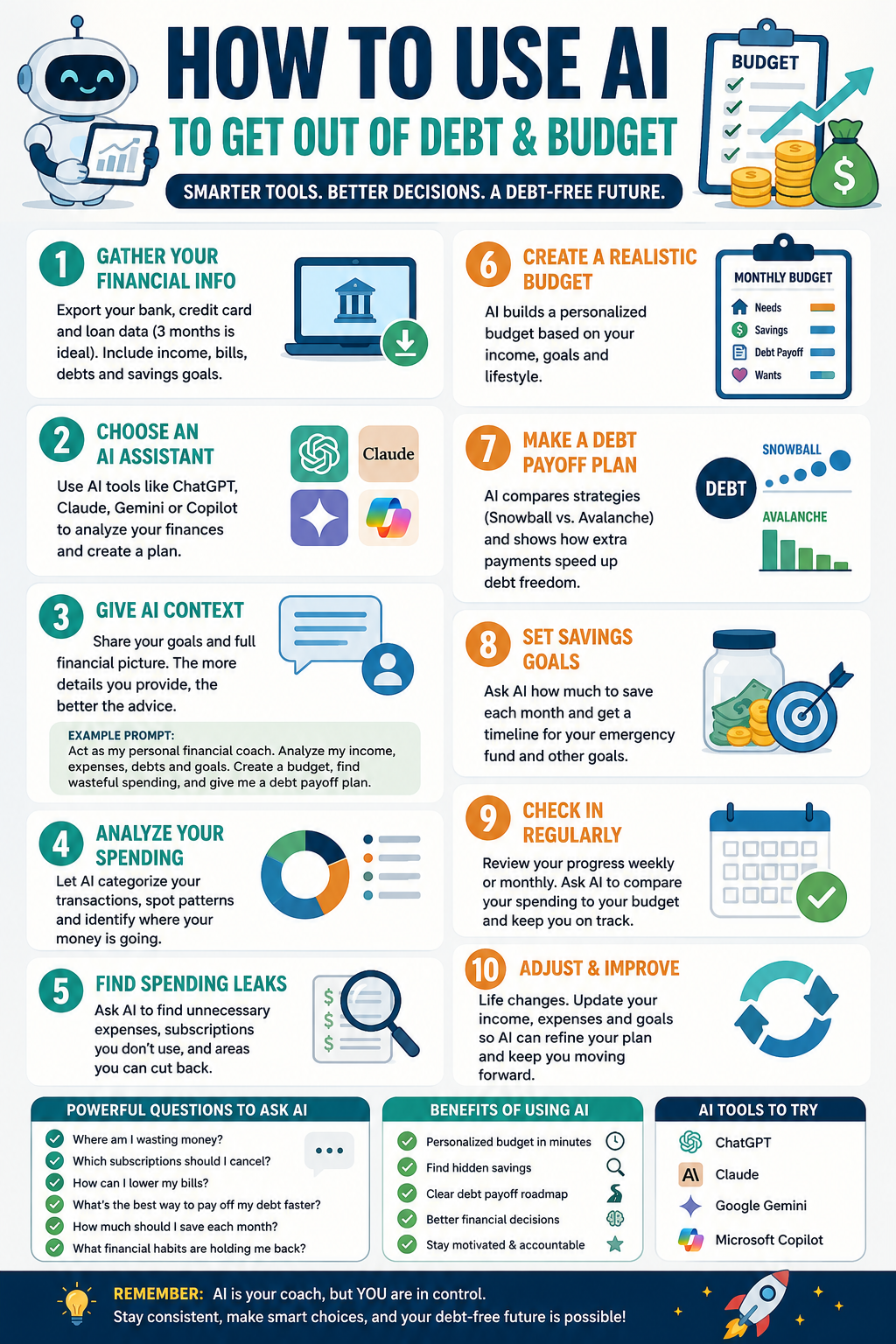
Start by Gathering Your Financial Information
Before asking AI to build a budget, collect some basic financial information. The more accurate your information is, the more personalized the recommendations will be.
Gather your monthly take-home income, recurring bills, debt payments, savings balances, and at least three months of bank and credit card transactions. If you have specific financial goals, such as paying off debt, building an emergency fund, or saving for a vacation, include those as well.
Most banks allow you to export your transaction history as a spreadsheet or CSV file. Before uploading anything, remove sensitive information such as account numbers or personal identification details.
Choose an AI Assistant
Several AI assistants are capable of helping with budgeting, including ChatGPT, Claude, Google Gemini, and Microsoft Copilot.
Each can review your spending, answer financial questions, and generate personalized budget recommendations. The experience is similar across platforms, so choosing one often comes down to personal preference.
Give AI Plenty of Context
One of the biggest mistakes people make is asking AI something vague like, “Create a budget for me.”
Instead, explain your financial situation.
Include your monthly income, regular expenses, debts, savings goals, and any major upcoming expenses. The more information AI has, the more useful its recommendations will be.
Here’s an example prompt you can use:
Act as my personal budgeting coach. Review my monthly income, recurring bills, debts, savings goals, and spending history. Organize my expenses into categories, identify unnecessary spending, recommend a realistic monthly budget, estimate how much I can save each month, and explain your recommendations. Ask follow-up questions before making assumptions.
This prompt encourages AI to ask questions instead of guessing, leading to more accurate advice.
Let AI Analyze Your Spending
Once you’ve provided your financial information, AI can quickly organize your spending into useful categories.
Typical categories include housing, transportation, groceries, restaurants, entertainment, shopping, healthcare, subscriptions, debt payments, and savings.
Seeing your spending organized this way often reveals patterns that are difficult to notice when simply reviewing bank statements.
For example, you may discover you’re spending more on takeout than groceries, or that several small subscriptions are quietly adding up each month.
Find Hidden Spending
One of AI’s biggest strengths is identifying recurring expenses that are easy to overlook.
Ask questions such as:
Where am I spending more than I realize?
Which subscriptions could I cancel?
What purchases happen repeatedly?
Which expenses have increased over the past few months?
Where could I realistically reduce spending without affecting my lifestyle?
These insights often uncover hundreds of dollars in potential savings over the course of a year.
Build a Budget That Fits Your Lifestyle
A good budget shouldn’t force you to give up everything you enjoy.
Instead of creating an unrealistic spending plan, ask AI to recommend a budget based on your actual habits.
If you enjoy eating out occasionally or spending money on hobbies, tell AI. It can adjust your budget while still helping you reach your financial goals.
The goal isn’t perfection. The goal is creating a budget you can actually stick to.
Set Savings Goals
AI can also help you determine how much you should save each month.
Ask questions like:
How long will it take to build a six-month emergency fund?
How quickly can I pay off my credit card debt?
Should I pay extra toward my loan or save more money?
How much can I comfortably save each month?
AI can calculate different scenarios and show how changing your monthly savings or debt payments affects your timeline.
Check In Every Week
Budgeting shouldn’t happen only once a month.
A quick weekly review can help you stay on track.
Simply ask AI to compare your spending for the week with your monthly budget and identify any areas where you’re overspending.
Making small adjustments throughout the month is much easier than trying to fix an entire month’s worth of overspending.
What AI Does Well
AI is especially useful for organizing expenses, identifying spending patterns, creating customized budgets, explaining financial concepts, tracking savings progress, and suggesting practical ways to reduce unnecessary spending.
It can also answer questions whenever you need clarification, making it feel more like a financial coach than a budgeting spreadsheet.
Understand Its Limitations
Although AI is an excellent budgeting assistant, it isn’t perfect.
It doesn’t know your personal priorities unless you explain them. It can’t predict unexpected expenses, and it shouldn’t replace professional financial advice for complex situations involving taxes, investing, or legal matters.
Always review AI’s recommendations before making important financial decisions.
Tips for Better Results
Provide several months of spending history whenever possible.
Be honest about your spending habits.
Include upcoming expenses such as vacations, holidays, or home repairs.
Ask follow-up questions if something doesn’t make sense.
Update your budget regularly as your income or expenses change.
The more information you provide, the more valuable AI becomes.
Final Thoughts
Artificial intelligence isn’t a magic solution, but it is an incredibly useful tool for anyone looking to take control of their finances.
Instead of spending hours organizing transactions and building spreadsheets, AI can analyze your spending in minutes, uncover money leaks, recommend realistic budgets, and help you develop better financial habits.
The best budget is one you can consistently follow. AI can help you build that budget, adjust it as your life changes, and keep you focused on your financial goals.
Whether you’re trying to save more, pay off debt, or simply understand where your money goes each month, AI can make budgeting easier than ever before.
Is InVideo AI Actually Worth It? A No-BS Review After Digging Through Real User Feedback
If you watch YouTube videos about InVideo AI, you’d think it’s some magical “type one sentence, make viral videos instantly” machine. Yeah… not exactly.
After digging through Reddit threads, verified review sites, tutorials, pricing pages, and user complaints, the honest answer is this: InVideo AI is legitimately useful for pumping out fast content at scale, especially faceless social videos, affiliate clips, YouTube Shorts, TikToks, and quick marketing content. But if you expect cinematic quality, deep editing control, or truly unique videos, you’re probably going to end up disappointed.
It’s one of those tools that feels amazing for the right person and incredibly frustrating for the wrong one.
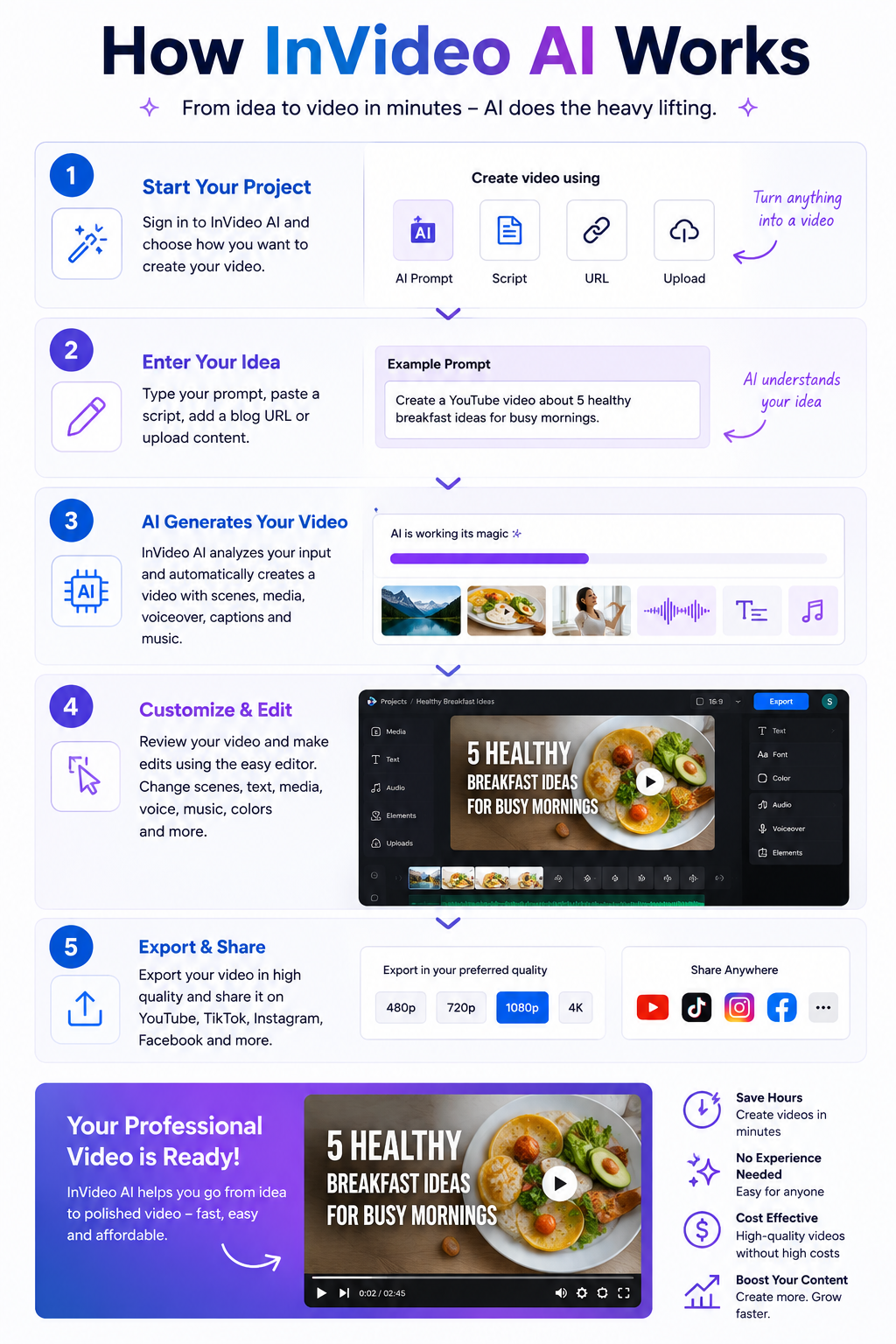
The biggest strength of InVideo AI is speed. You feed it a prompt, script, blog post, or idea, and it automatically builds scenes, stock footage, subtitles, transitions, music, pacing, AI voiceovers, and formatting for social platforms. For beginners, that’s honestly pretty impressive. A lot of users say they created their first usable YouTube or TikTok videos with it because the learning curve is much easier compared to professional editing software like Adobe Premiere Pro or DaVinci Resolve.
That’s really who this tool is for: marketers, affiliate sites, agencies, faceless YouTube channels, small businesses, and people who simply hate editing. If your goal is “make decent videos fast,” InVideo AI actually does a solid job.
Some marketers are using it to mass produce review videos, blog-to-video content, and social clips because it compresses production time dramatically. And honestly, that makes sense. The software is built around efficiency more than creativity.
But here’s where the hype starts falling apart a little. A huge number of users mention the same issue: the videos eventually start looking generic. Not always bad. Just very obviously AI generated.
You start noticing repetitive stock footage, predictable pacing, robotic storytelling structure, dramatic zoom effects, emotionally empty narration, and that weird “template energy” you see all over TikTok and YouTube now. After a while, you can almost instantly tell when a video came from one of these AI generators.
That’s the tradeoff. Tools like this optimize for speed, not originality.
If you’re building a real brand with personality and authenticity, you’ll probably outgrow InVideo AI pretty quickly. The more polished and human you want your videos to feel, the more manual editing you end up doing anyway.
The AI voiceovers are better than expected though. Compared to older AI video generators from a few years ago, the narration quality has improved a lot. Some voices sound surprisingly natural, especially on the higher-tier plans. Still, it’s not perfect. You’ll occasionally get awkward pauses, strange pronunciations, weird emotional emphasis, or robotic tone shifts that instantly remind viewers they’re listening to AI.
The free version is also not nearly as generous as some creators make it sound. Technically there is a free plan, but it comes with watermarks, export limits, credit restrictions, and lower quality output. It’s useful for testing the platform, but if you actually want professional-looking exports, you’ll almost certainly need a paid subscription.
And honestly, the credit system seems to be one of the biggest frustrations users complain about. Several reviews mention burning credits on video generations that didn’t turn out usable. That’s one of the hidden annoyances with AI creation tools in general right now: you’re often paying for attempts instead of guaranteed quality.
Reddit’s opinion on InVideo AI is mixed as hell. Some people genuinely love it because it helped them launch channels faster and stay consistent with content creation. Others absolutely hate it and complain about billing issues, generic outputs, poor customer support, or overhyped marketing.
That split actually tells you everything you need to know. Your experience with InVideo AI depends almost entirely on your expectations.
If you expect AI to completely replace real editors and magically create viral content with one prompt, you’ll probably hate it. If you treat it like a fast first-draft machine that saves time and handles repetitive editing work, you’ll probably find it useful.
Where InVideo AI makes the most sense is faceless YouTube channels, affiliate marketing content, local business promos, blog-to-video repurposing, quick social content, PPC companion videos, and high-volume agency work where speed matters more than artistic perfection.
Where it makes less sense is premium storytelling, cinematic content, emotional documentaries, luxury branding, creative filmmaking, or anything where uniqueness and human personality are the main selling point.
There’s also a growing AI fatigue online right now. Audiences are getting better at spotting low-effort generated content, and people can absolutely feel when videos have no personality or soul behind them. That matters more than a lot of AI marketers want to admit.
Some of the biggest competitors to InVideo AI are starting to catch up fast, and in some cases they actually do certain things better depending on what kind of creator you are.
Pictory is probably one of the closest direct competitors. It’s heavily focused on turning blog posts and scripts into social videos quickly, which makes it popular with affiliate marketers and SEO publishers.
Synthesia is more business-focused and known for realistic AI avatars. It’s used a lot for training videos, corporate explainers, and presentations rather than viral social content.
HeyGen exploded in popularity because of its AI avatars, face swapping, multilingual voice cloning, and realistic presenter videos. A lot of creators think it feels more modern and polished than older AI video tools.
Runway ML is more advanced and creative-focused. It’s closer to an AI filmmaking platform than a beginner drag-and-drop editor. The learning curve is higher, but the creative potential is much bigger.
Descript is incredibly popular with podcasters and YouTubers because it lets you edit video almost like editing a Word document. Its AI voice cloning and transcription tools are honestly some of the best in the space.
VEED.io has become a favorite for fast social media editing, captions, clips, and browser-based editing. Many creators feel its interface is cleaner and easier to use than InVideo.
Canva Video is surprisingly strong now. It’s not as AI-heavy as some competitors, but for marketers already using Canva, the workflow can feel smoother and more flexible.
CapCut is dominating short-form content creation right now, especially for TikTok creators. The mobile editing experience and built-in effects are honestly hard to beat for free or low-cost editing.
Lumen5 focuses heavily on transforming articles and written content into marketing videos. It’s very similar to InVideo in some ways but leans more toward branded business content.
Animoto has been around for years and is still popular with small businesses that need simple slideshow-style promo videos without learning complicated editing software.
What’s interesting is that the AI video space is moving insanely fast right now. A tool that feels cutting-edge today can honestly feel outdated six months later. That’s why a lot of creators bounce between multiple platforms instead of staying loyal to just one.
InVideo AI still competes well because it balances speed, automation, templates, and beginner friendliness pretty effectively. But it’s definitely no longer the only serious player in the AI video game.
So is InVideo AI worth it? Honestly, yes for some people and absolutely not for others.
If you value speed over perfection, need lots of content quickly, run faceless channels, or hate editing, it can genuinely save you time and money. If you care deeply about originality, premium visuals, emotional storytelling, or building a unique creative brand, you’ll probably end up frustrated and eventually move toward more advanced workflows.
The simplest way to describe InVideo AI is this: it’s basically Canva for AI video production. Fast, convenient, occasionally impressive, but sometimes painfully generic.
For marketers and content grinders, it can absolutely be worth the money. For creatives chasing originality, probably not.
For decades, cars represented freedom. You got behind the wheel, rolled down the windows, and went wherever you wanted without much thought about who — or what — was watching. But that relationship between drivers and vehicles is rapidly changing, and many experts believe the next generation of cars may become some of the most sophisticated surveillance devices Americans own.
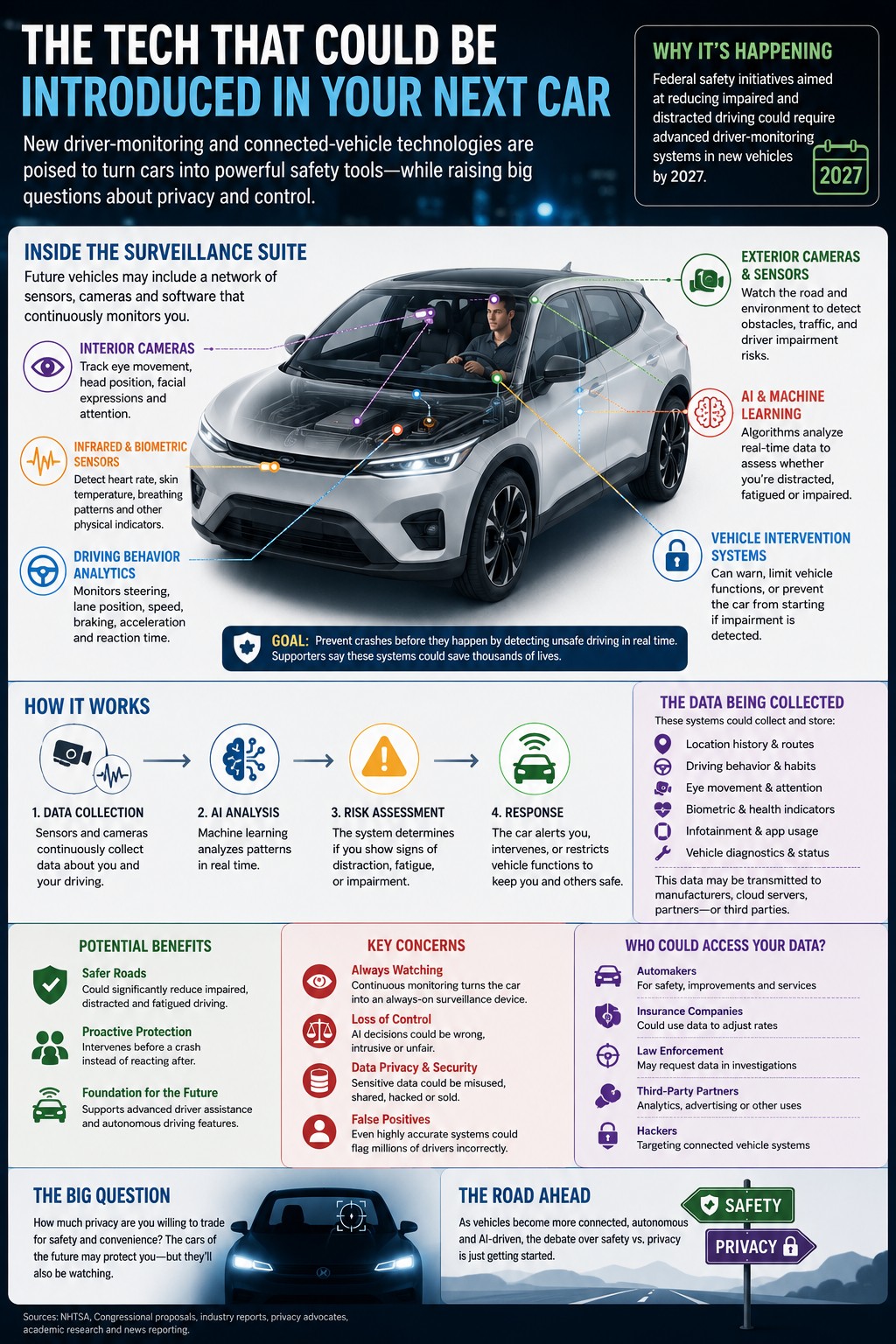
A growing national debate has erupted around new driver-monitoring technologies expected to become standard in future vehicles. Federal safety initiatives tied to impaired-driving prevention could require automakers to install advanced systems capable of monitoring driver behavior in real time by 2027. These systems use cameras, infrared sensors, artificial intelligence, and biometric tracking to analyze whether a driver appears distracted, fatigued, intoxicated, or otherwise impaired.
Supporters argue the technology could save thousands of lives. Drunk and distracted driving remain major causes of fatal crashes across the United States, and safety advocates say proactive monitoring systems could prevent accidents before they happen. Instead of reacting after dangerous driving occurs, future vehicles may intervene immediately by issuing warnings, limiting vehicle functions, or even preventing a car from starting altogether if impairment is detected.
But critics say the technology crosses a line that Americans may not fully understand yet.
Unlike traditional safety systems such as airbags or anti-lock brakes, these new systems continuously observe the driver. Cameras can track eye movement, head position, attention span, blinking patterns, and steering behavior. Some proposed technologies could eventually monitor heart rate, breathing patterns, or other physical indicators. Privacy advocates argue this transforms the car from a transportation tool into an always-on monitoring device.
One of the biggest fears centers around control. If artificial intelligence systems determine whether someone is “fit” to drive, critics worry about false positives and machine-made decisions interfering with everyday life. Something as simple as driving while tired after work, looking away briefly, or appearing stressed could potentially trigger warnings or restrictions depending on how sensitive the system becomes.
Even federal safety officials have acknowledged the challenge. According to reporting on the issue, transportation regulators noted that even systems with extremely high accuracy rates could still generate millions of false positives annually simply because of the enormous number of drivers on American roads every day.
Beyond the immediate driving experience, another question keeps surfacing: where does all the data go?
Modern vehicles already collect huge amounts of information, including location history, driving speed, braking habits, navigation routes, maintenance diagnostics, and infotainment usage. Many connected vehicles upload portions of that information to cloud-based systems operated by manufacturers. New driver-monitoring systems would dramatically increase the amount of behavioral data collected inside vehicles.
That has sparked fears about how the data could eventually be used. Privacy groups worry insurers could use driver-behavior data to adjust rates. Law enforcement agencies could potentially request access to vehicle records during investigations. Hackers may target connected systems storing sensitive information. Meanwhile, cybersecurity researchers have already demonstrated how location histories and other vehicle data can sometimes be extracted from connected cars.
The concerns are not entirely theoretical anymore. Researchers examining connected vehicle systems have warned that some modern cars already broadcast signals capable of revealing location information, while newer electric vehicles increasingly function more like rolling computers than traditional automobiles.
Automakers, however, argue that software-driven vehicles are the future. Advanced driver assistance systems, automatic emergency braking, adaptive cruise control, and lane-centering technologies all rely on increasing amounts of data and automation. Industry leaders believe AI-powered systems will eventually make roads dramatically safer while improving navigation, maintenance, and autonomous driving capabilities.
Some researchers believe society may already be becoming desensitized to automotive surveillance. A recent academic study examining autonomous vehicle users found many drivers viewed in-car monitoring as simply another extension of the broader digital surveillance already normalized through smartphones, apps, smart homes, and online platforms.
Still, the emotional reaction many drivers have toward surveillance inside vehicles feels different because cars occupy such a personal space in everyday life. For millions of Americans, driving represents privacy, independence, and personal control. The idea that a car may constantly evaluate its owner’s behavior — and potentially override human decisions — creates discomfort that goes beyond ordinary technology debates.
At the center of the issue is a difficult balancing act between safety and freedom. Few people oppose reducing drunk driving deaths. But many remain uneasy about handing that responsibility to software systems capable of watching, recording, analyzing, and reacting to human behavior every time someone gets behind the wheel.
As vehicles become more connected, autonomous, and AI-driven, the future of driving may involve more than horsepower and fuel economy. It may also force Americans to decide how much privacy they are willing to trade for convenience and safety.