
ai editing
Is InVideo AI Actually Worth It? A No-BS Review After Digging Through Real User Feedback
If you watch YouTube videos about InVideo AI, you’d think it’s some magical “type one sentence, make viral videos instantly” machine. Yeah… not exactly.
After digging through Reddit threads, verified review sites, tutorials, pricing pages, and user complaints, the honest answer is this: InVideo AI is legitimately useful for pumping out fast content at scale, especially faceless social videos, affiliate clips, YouTube Shorts, TikToks, and quick marketing content. But if you expect cinematic quality, deep editing control, or truly unique videos, you’re probably going to end up disappointed.
It’s one of those tools that feels amazing for the right person and incredibly frustrating for the wrong one.
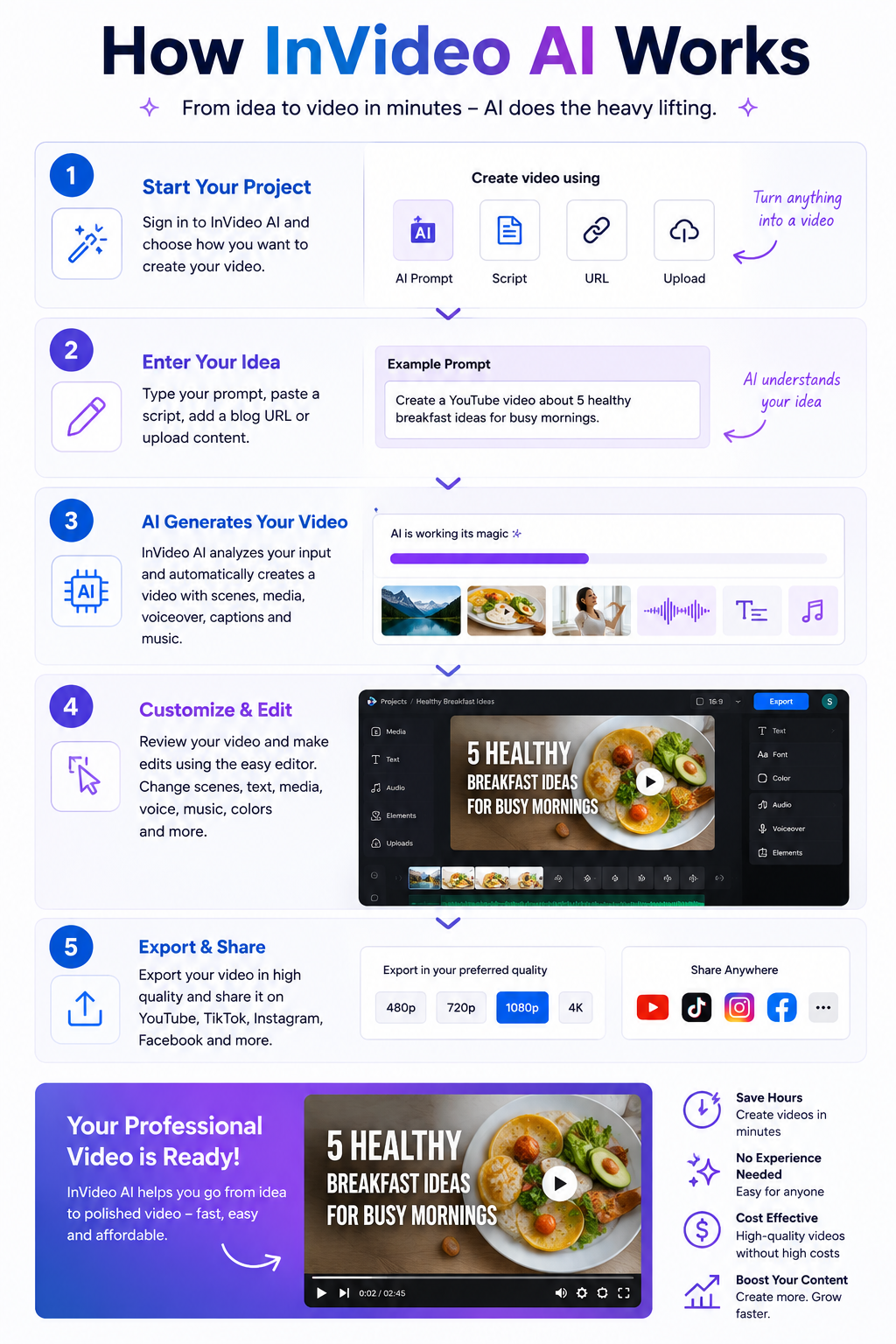
The biggest strength of InVideo AI is speed. You feed it a prompt, script, blog post, or idea, and it automatically builds scenes, stock footage, subtitles, transitions, music, pacing, AI voiceovers, and formatting for social platforms. For beginners, that’s honestly pretty impressive. A lot of users say they created their first usable YouTube or TikTok videos with it because the learning curve is much easier compared to professional editing software like Adobe Premiere Pro or DaVinci Resolve.
That’s really who this tool is for: marketers, affiliate sites, agencies, faceless YouTube channels, small businesses, and people who simply hate editing. If your goal is “make decent videos fast,” InVideo AI actually does a solid job.
Some marketers are using it to mass produce review videos, blog-to-video content, and social clips because it compresses production time dramatically. And honestly, that makes sense. The software is built around efficiency more than creativity.
But here’s where the hype starts falling apart a little. A huge number of users mention the same issue: the videos eventually start looking generic. Not always bad. Just very obviously AI generated.
You start noticing repetitive stock footage, predictable pacing, robotic storytelling structure, dramatic zoom effects, emotionally empty narration, and that weird “template energy” you see all over TikTok and YouTube now. After a while, you can almost instantly tell when a video came from one of these AI generators.
That’s the tradeoff. Tools like this optimize for speed, not originality.
If you’re building a real brand with personality and authenticity, you’ll probably outgrow InVideo AI pretty quickly. The more polished and human you want your videos to feel, the more manual editing you end up doing anyway.
The AI voiceovers are better than expected though. Compared to older AI video generators from a few years ago, the narration quality has improved a lot. Some voices sound surprisingly natural, especially on the higher-tier plans. Still, it’s not perfect. You’ll occasionally get awkward pauses, strange pronunciations, weird emotional emphasis, or robotic tone shifts that instantly remind viewers they’re listening to AI.
The free version is also not nearly as generous as some creators make it sound. Technically there is a free plan, but it comes with watermarks, export limits, credit restrictions, and lower quality output. It’s useful for testing the platform, but if you actually want professional-looking exports, you’ll almost certainly need a paid subscription.
And honestly, the credit system seems to be one of the biggest frustrations users complain about. Several reviews mention burning credits on video generations that didn’t turn out usable. That’s one of the hidden annoyances with AI creation tools in general right now: you’re often paying for attempts instead of guaranteed quality.
Reddit’s opinion on InVideo AI is mixed as hell. Some people genuinely love it because it helped them launch channels faster and stay consistent with content creation. Others absolutely hate it and complain about billing issues, generic outputs, poor customer support, or overhyped marketing.
That split actually tells you everything you need to know. Your experience with InVideo AI depends almost entirely on your expectations.
If you expect AI to completely replace real editors and magically create viral content with one prompt, you’ll probably hate it. If you treat it like a fast first-draft machine that saves time and handles repetitive editing work, you’ll probably find it useful.
Where InVideo AI makes the most sense is faceless YouTube channels, affiliate marketing content, local business promos, blog-to-video repurposing, quick social content, PPC companion videos, and high-volume agency work where speed matters more than artistic perfection.
Where it makes less sense is premium storytelling, cinematic content, emotional documentaries, luxury branding, creative filmmaking, or anything where uniqueness and human personality are the main selling point.
There’s also a growing AI fatigue online right now. Audiences are getting better at spotting low-effort generated content, and people can absolutely feel when videos have no personality or soul behind them. That matters more than a lot of AI marketers want to admit.
Some of the biggest competitors to InVideo AI are starting to catch up fast, and in some cases they actually do certain things better depending on what kind of creator you are.
Pictory is probably one of the closest direct competitors. It’s heavily focused on turning blog posts and scripts into social videos quickly, which makes it popular with affiliate marketers and SEO publishers.
Synthesia is more business-focused and known for realistic AI avatars. It’s used a lot for training videos, corporate explainers, and presentations rather than viral social content.
HeyGen exploded in popularity because of its AI avatars, face swapping, multilingual voice cloning, and realistic presenter videos. A lot of creators think it feels more modern and polished than older AI video tools.
Runway ML is more advanced and creative-focused. It’s closer to an AI filmmaking platform than a beginner drag-and-drop editor. The learning curve is higher, but the creative potential is much bigger.
Descript is incredibly popular with podcasters and YouTubers because it lets you edit video almost like editing a Word document. Its AI voice cloning and transcription tools are honestly some of the best in the space.
VEED.io has become a favorite for fast social media editing, captions, clips, and browser-based editing. Many creators feel its interface is cleaner and easier to use than InVideo.
Canva Video is surprisingly strong now. It’s not as AI-heavy as some competitors, but for marketers already using Canva, the workflow can feel smoother and more flexible.
CapCut is dominating short-form content creation right now, especially for TikTok creators. The mobile editing experience and built-in effects are honestly hard to beat for free or low-cost editing.
Lumen5 focuses heavily on transforming articles and written content into marketing videos. It’s very similar to InVideo in some ways but leans more toward branded business content.
Animoto has been around for years and is still popular with small businesses that need simple slideshow-style promo videos without learning complicated editing software.
What’s interesting is that the AI video space is moving insanely fast right now. A tool that feels cutting-edge today can honestly feel outdated six months later. That’s why a lot of creators bounce between multiple platforms instead of staying loyal to just one.
InVideo AI still competes well because it balances speed, automation, templates, and beginner friendliness pretty effectively. But it’s definitely no longer the only serious player in the AI video game.
So is InVideo AI worth it? Honestly, yes for some people and absolutely not for others.
If you value speed over perfection, need lots of content quickly, run faceless channels, or hate editing, it can genuinely save you time and money. If you care deeply about originality, premium visuals, emotional storytelling, or building a unique creative brand, you’ll probably end up frustrated and eventually move toward more advanced workflows.
The simplest way to describe InVideo AI is this: it’s basically Canva for AI video production. Fast, convenient, occasionally impressive, but sometimes painfully generic.
For marketers and content grinders, it can absolutely be worth the money. For creatives chasing originality, probably not.