

review
Tired of wrestling with gas-powered leaf blowers or dealing with tangled cords? The Sihuird Cordless Leaf Blower SL9501 is a game-changer for homeowners looking for serious cleaning power without the hassle. In this review, based on a hands-on gadget test, we’ll break down why this tool stands out for everyday yard work, driveway cleaning, and seasonal leaf battles.
Watch the full 9malls review on YouTube
Unboxing and First Impressions
Right out of the box, this blower feels substantial. It comes with two high-capacity 21V batteries, a dual rapid charger, a comfortable shoulder strap with easy metal clips, multiple tubes, and built-in LED lighting. The design is modern with a cool logo, rubberized non-slip handle, and solid plastic construction that feels durable. It has a safety switch to prevent accidental starts. The shoulder strap makes it comfortable for longer sessions, and the dual battery setup means you can swap or charge both at once.
Tech Specs Highlights
Up to 765 CFM air volume, high wind speeds around 190 MPH, 3 variable speeds plus Turbo mode, brushless motor for efficiency, LED front light for low-light use, and lightweight design.
Real-World Performance Test
In a head-to-head test against an older cordless blower, the Sihuird performed impressively. It blasted wood chips, heavy debris, pine cones, rocks, and leaves with ease where the older model struggled. Turbo mode was described as insane for tough jobs. The built-in LED light is perfect for early mornings or dusk cleanup. Battery life held up well, with dual packs providing extended runtime. It’s loud as expected from a powerful blower but quieter than gas models.
Pros and Cons
Pros:
Cordless freedom with long-lasting batteries
Comfortable ergonomics and shoulder strap
Versatile speeds and Turbo boost
LED light and safety features
Great value with high-quality build
Cons:
Noisy during operation
Heavier than ultra-light models when fully assembled
Who Is It For?
Perfect for homeowners with medium to large yards, patios, driveways, or garages. It handles fall leaves, spring debris, or garage cleanup without the maintenance, fumes, or frustration of gas blowers.
Final Verdict
The Sihuird Cordless Leaf Blower delivers where it matters most: raw power, convenience, and reliability. It exceeded expectations at this price point and comes highly recommended as a great value upgrade.Ready to upgrade your yard game? Check it out on Amazon. This post is inspired by a 9malls review video. Always verify current specs and pricing. What’s your biggest yard cleanup headache? This blower might just solve it!
AI video generators are everywhere in 2026, but two names keep appearing at the top of comparison lists: Pictory and InVideo. Both can turn text into videos, generate voiceovers, create social media content, and automate editing. The real question is which platform delivers more value for creators who are actually paying the subscription.
Let’s compare the numbers.
Pictory Pricing
Pictory’s Starter plan costs approximately $25-$29 per month and includes 200 video minutes, 5 GB of storage, one brand kit, 60 minutes of ElevenLabs AI voice generation, and access to millions of stock videos from Getty Images and Storyblocks. Professional plans jump to around $35-$59 per month depending on billing cycle and increase video generation to 600 minutes, 20 GB storage, 5 brand kits, additional AI credits, and larger stock media libraries. Enterprise and Team plans go significantly higher.
InVideo Pricing
InVideo takes a different approach. The platform offers a free tier with watermarked exports, while paid plans start around $20-$25 per month. The Plus plan typically includes roughly 50 AI video generations, voice cloning, stock media access, and unlimited exports. The Max plan ranges from about $48-$60 monthly and substantially increases AI generation limits, storage, and concurrency. Higher plans can exceed $100 monthly for heavy users.
Winner: InVideo
If your primary concern is entry-level pricing and getting started with AI video generation, InVideo offers more affordable starting options and a true free plan. Pictory offers a free trial but no permanent free tier.
Content Repurposing
This is where Pictory becomes interesting.
Pictory can create videos from:
Blog posts
URLs
Scripts
Articles
PowerPoint presentations
Existing videos
Audio recordings
Images
A blogger can literally paste a 2,000-word article and have the system automatically generate scenes, captions, stock footage, and voice narration. Pictory also includes URL-to-video conversion, something InVideo currently lacks.
For affiliate marketers, niche site owners, and YouTubers creating faceless content, this feature alone can save hours per video.
Winner: Pictory
Video Editing Experience
The editing experience is dramatically different between the two platforms.
Pictory uses a scene-based editor. Most edits happen through text and AI automation. You don’t spend much time dragging clips around a timeline.
InVideo feels closer to Adobe Premiere or Canva. Users receive more templates, more animations, more transitions, and significantly greater control over how the final video looks. InVideo is often preferred by agencies and marketers producing branded content because nearly every element can be customized.
Winner: InVideo
Stock Media Libraries
Pictory provides access to Getty Images and Storyblocks assets. Depending on your plan, access can range from approximately 5 million clips to over 18 million stock assets.
InVideo includes stock footage from providers including iStock and Storyblocks while also integrating access to hundreds of AI generation models and media tools.
Winner: Tie
AI Features
Pictory includes:
Blog-to-video conversion
URL-to-video conversion
AI avatars
AI voiceovers
Auto-captioning
PowerPoint-to-video
Image generation
Video generation from prompts
InVideo includes:
Text-to-video
Prompt-to-video
Voice cloning
AI script writing
Multiple AI video models
AI agents
Timeline editing
Template-driven workflows
Pictory focuses on automation. InVideo focuses on flexibility.
Best Use Cases
Choose Pictory if:
You run blogs
You publish affiliate content
You create faceless YouTube channels
You repurpose articles into videos
You want automation more than customization
Choose InVideo if:
You run a marketing agency
You need branded videos
You want extensive design control
You create social media ads
You enjoy editing and customization
The 9malls Verdict
For the average content creator, Pictory is probably the more useful tool. The ability to convert blog posts, URLs, scripts, PowerPoints, and existing content directly into videos creates a workflow that saves real time. If your goal is publishing more content with less effort, Pictory has a clear advantage.
However, if you’re producing client work, advertising campaigns, or highly branded social media content, InVideo’s editing flexibility and lower starting price make it difficult to ignore.
Bottom line: Pictory wins for content repurposing and automation. InVideo wins for creative control and customization. Most bloggers, affiliate marketers, and faceless YouTube creators will likely get more value from Pictory, while agencies and professional video marketers may prefer InVideo.
Hey everyone, welcome back to 9malls for another gadget deep dive! Today I’m putting the Wuben X1 Pro Rechargeable Flashlight through its paces. This isn’t your average EDC light—this thing claims a massive 12,300 lumens, and after hands-on testing, I’m calling it one of the most powerful flashlights I’ve reviewed yet. If you’re into camping, emergencies, hiking, or just need serious illumination, this flat-shaped powerhouse deserves a spot in your gear bag.
Watch the full 9malls review on YouTube of the Wuben Flashlight
Wuben has been killing it with their flashlights, and the X1 Pro feels like their flagship upgrade. It’s built with premium all-metal construction that gives it a solid, high-end feel—like a well-made pocket tool. The compact yet hefty body houses two large 21700 batteries, delivering serious runtime and output. It features a dual-beam system: spotlight for distance and floodlight for wide coverage, plus strobe modes. IP65 rated for water and dust resistance, it’s ready for real-world adventures.
Unboxing was impressive right away. The packaging is thoughtful with a nice box, info packet, belt holder, lanyard strap, charging cable, and even spare accessories. The flashlight itself feels tank-like—heavier than previous Wuben models I’ve tried, but still portable enough for everyday carry thanks to its flat design. Pop open the battery compartment (with a handy lock switch for safety), remove the plastic tabs on the batteries, and you’re good to go.Operation is straightforward and user-friendly. A side switch cycles through modes: eco, low, medium, high, and turbo. Double-click for turbo blast, triple-click for strobe. There’s even a built-in removable fan for active cooling on high-output modes—super smart for sustained performance without overheating. Five clicks toggles the fan, which I could clearly hear whirring. Battery life looks excellent on paper: up to 220 hours in eco mode, 14 hours low, and still solid on higher settings. It also supports reverse charging as a power bank in a pinch.
The real test is the brightness. In the house, even the lower modes lit things up dramatically, but turbo mode was borderline blinding—way brighter than my previous go-to Wuben light. I took it out to a field at night for the ultimate comparison. Turbo lit up a huge area like daylight, throwing the beam an impressive distance. Spotlight punches far, while flood fills everything in between. Curtains in the room? Instantly visible from across the space. This thing turns night into day.
Pros that stand out: incredible build quality, versatile modes, long battery life, thoughtful extras like the belt clip and fan, and a strong warranty (15-day exchange, up to lifetime repair for registered users). It’s a beast that feels premium and performs like one. If you want something ultra-compact for pocket carry, a smaller Wuben might suit better, but for high-performance needs, the X1 Pro delivers.
Overall, the Wuben X1 Pro earns a big thumbs up from me. It’s powerful, durable, and packed with features that make it more than just a flashlight—it’s a reliable tool for any scenario. Highly recommended if you’re serious about lighting.What do you think—ready to upgrade your flashlight game? Drop your favorite lights or uses in the comments. Thanks for reading and watching the full review for the unboxing, mode demos, and night test footage. Links below to grab one on Amazon. All opinions my own—stay bright out there!Find the Wuben X1 Pro on Amazon. Support 9malls on Patreon for more exclusive gadget reviews. Until next time, keep it illuminated!
Hey everyone, welcome back to another hands-on review from 9malls! Today we’re diving into something delicious and premium: FishWife Smoked Salmon. I’ve reviewed FishWife products before, and their tinned seafood consistently impresses with quality and flavor. This time, I put their smoked salmon to the test straight from the tin and in a quick, AI-inspired dip recipe. Spoiler: it did not disappoint.
Check out the full review on YouTube here from 9malls: https://www.youtube.com/watch?v=Yk6XUUApHtg
Shop Fish Wife direction here: https://fishwife.sjv.io/xLYgoA
I picked up this pack recently—it’s now showing up at places like Costco, and you can easily grab it online through Amazon or direct from FishWife. Each tin is 3.2 ounces of responsibly raised smoked salmon from Norway. The packaging alone stands out—clean, premium, and it screams “world’s tastiest tinned fish,” which they boldly claim on the label. After trying their other varieties in the past, I was excited to crack this one open.First things first: tasting it on its own. The moment I opened the tin, the aroma hit—rich salmon with that perfect subtle smokiness. A small bite confirmed it: tender, flavorful, with just the right balance of smoke and fresh ocean taste. No fishy aftertaste, just pure quality. It’s the kind of product that elevates any meal, whether you’re eating it solo or mixing it in.To stretch it further and create something shareable, I whipped up a simple smoked salmon dip using the whole tin. I softened some cream cheese as the base, then mixed in diced jalapenos (for a little heat), onion (for tang), and tomato (for cool freshness). I kept it light on extras—just a tiny sprinkle of everything bagel seasoning and a hint of garlic for depth, based on what I had handy and some quick AI recipe inspiration. Mixing it all together was easy; the salmon flakes apart beautifully into the creamy base.
The taste test on a cracker? Outstanding. The richness of the cream cheese pairs perfectly with the smokiness of the salmon, while the jalapeno adds a gentle kick, the onion brings zing, and the tomato cools it all down. On Milton’s Everything gourmet crackers, it was next-level—crunchy, savory, and addictive. I’d rate this homemade dip a solid 8 out of 10. It’s quick to make, impressive for guests, and turns one tin into something that serves multiple people.FishWife Smoked Salmon earns a strong recommendation from me. It’s versatile enough for breakfast bagels, lunch salads, dinner pastas, or this easy dip that makes it go further. The quality shines through every bite, and it’s clear why this brand is gaining fans for premium tinned seafood. If you’re looking to upgrade your snacks or entertaining game, this is a winner.Have you tried FishWife yet? Drop your favorite ways to enjoy smoked salmon in the comments—I’d love to hear! Thanks for watching and reading. Until next time, keep it tasty. Check out the full video for the unboxing and step-by-step mixing.Links: Grab FishWife Smoked Salmon on Amazon or their site. Support 9malls on Patreon for more exclusive reviews. All opinions are my own—happy taste testing!
Saving money online used to mean digging through random coupon websites that looked like they hadn’t been updated since 2007. Half the promo codes didn’t work, the other half expired years ago, and somehow every website claimed they had “exclusive deals” nobody else had.
Now people mostly let apps do the work for them.
Coupon and cashback apps have become insanely popular over the last few years because online shopping is basically part of everyday life now. Whether someone is buying groceries, electronics, clothes, or completely unnecessary stuff at 2 AM, everybody wants to feel like they got a better deal than the listed price.
That’s where these apps come in.
Honey is probably still the most recognizable name in the coupon world. Even people who never used it probably know about it because of how aggressively it was advertised on YouTube for years. The app automatically tests coupon codes during checkout, which sounds simple, but honestly that convenience is why millions of people installed it.
People like things that save money without requiring effort. That’s basically Honey’s entire appeal.
Rakuten is another one that keeps showing up everywhere. Instead of focusing mostly on coupon codes, Rakuten pushes cashback rewards. You shop through participating stores and get a percentage of your purchase back later. It’s slower than instant discounts, but frequent shoppers end up liking the “getting paid to shop” feeling.
Then there’s Capital One Shopping, which has grown pretty quickly lately. A lot of people compare it directly to Honey because both work as browser extensions, but Capital One Shopping focuses more on price comparisons and finding lower listings across different retailers.
Some users actually prefer it because it feels less cluttered.
RetailMeNot is kind of the old-school survivor of internet coupon culture. Before browser extensions took over everything, people were already checking RetailMeNot for promo codes before buying stuff online. It still sticks around because sometimes simple databases of discount codes are still useful.
Honestly though, coupon apps aren’t magic.
Sometimes they find huge discounts. Other times they save you thirty-seven cents and act like they changed your life. Experiences vary a lot depending on what stores people use and how often they shop online.
There’s also the privacy side of things that more users have started paying attention to. Since these apps track shopping activity and browser behavior to some extent, people have become more cautious about which extensions they install. A few coupon apps have even faced criticism over affiliate commissions and how they make money behind the scenes.
Still, most shoppers don’t really care as long as the discounts work.
That’s probably the biggest reason coupon apps continue growing. Prices online keep going up, people are tired of overpaying, and nobody enjoys manually searching for promo codes anymore. Browser extensions made the process automatic, and once shoppers got used to that convenience, there was no going back.
At this point, coupon apps are almost part of online shopping culture itself. Some people install multiple extensions at once hoping one of them finds a better deal than the others. It’s basically digital bargain hunting now.
And honestly? In an economy where everything feels expensive lately, people will absolutely keep chasing those little checkout discounts whenever they can.
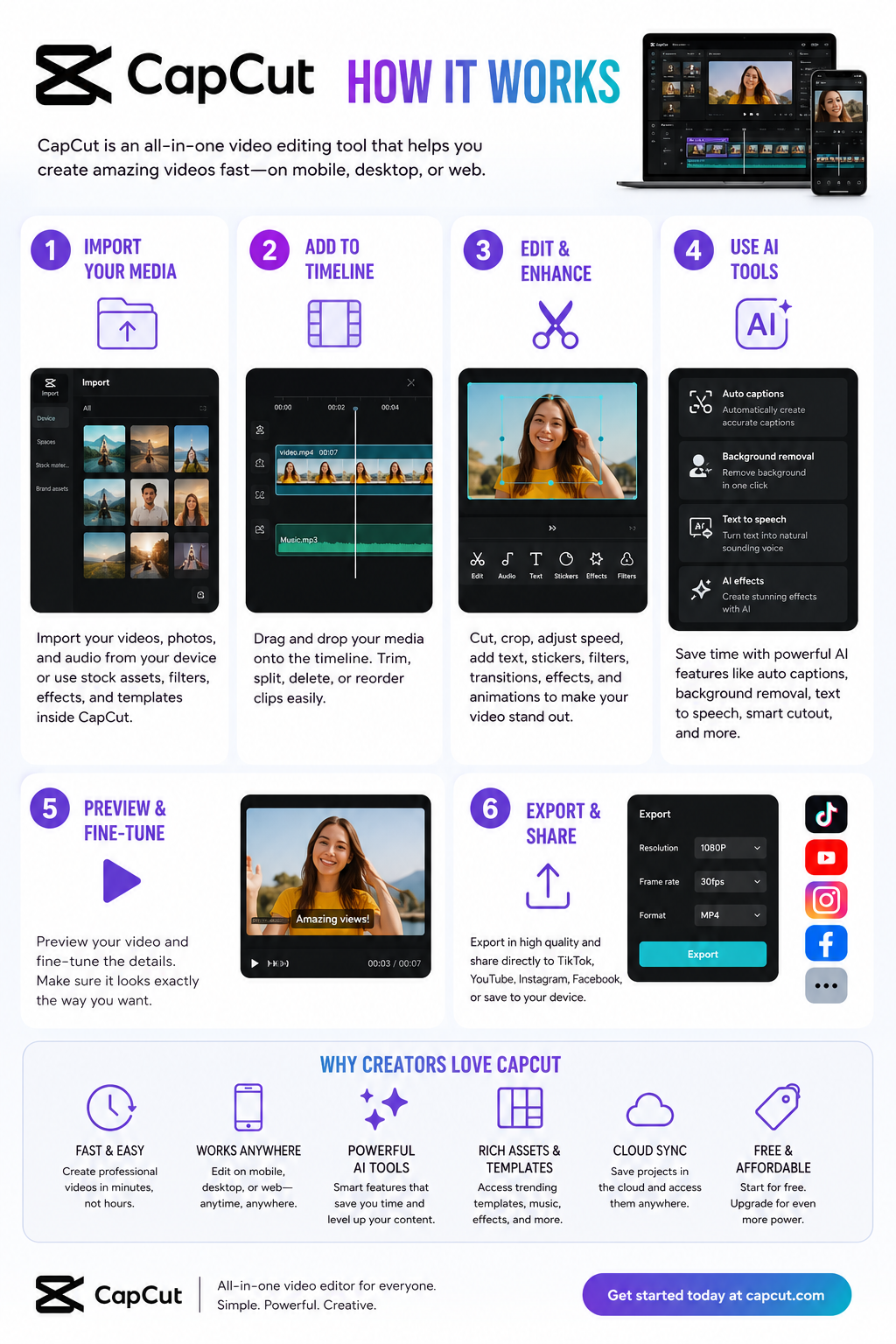
If you make videos for TikTok, YouTube Shorts, Instagram Reels, ads, product promos, or even basic business content, you’ve probably heard people hype up CapCut like it’s some kind of magic editing app. And honestly? A lot of that hype is deserved. But there’s also a mountain of misleading reviews pretending CapCut is either a flawless Adobe killer or complete trash. Reality sits somewhere in the middle.
CapCut became huge because it solved a problem most video editors ignored for years: people wanted fast content, not film school. Traditional editors like Adobe Premiere Pro and DaVinci Resolve are incredibly powerful, but they can feel painfully slow for social media creators. CapCut flipped the experience entirely. Instead of building around timelines first, it built around speed, templates, captions, vertical video, trends, and AI automation. That changed everything.
The biggest reason CapCut exploded is simple: it removes friction. You can record a clip, auto-caption it, add transitions, background music, motion effects, zoom cuts, and export something that looks professionally edited in minutes. For short-form creators, that matters more than advanced cinema-grade controls. Reddit creators constantly mention that CapCut’s workflow feels dramatically faster for social media content than older professional editors.
Where CapCut really shines is automation. Auto-captions alone save creators hours every week. The AI subtitle system is surprisingly accurate for normal speech and automatically styles captions for social platforms. Background removal is another standout feature. Instead of manually masking subjects frame-by-frame like older editing software required, CapCut lets beginners create polished edits with one click.
The mobile experience is arguably the best part of the entire platform. Most mobile editors still feel like stripped-down desktop software. CapCut doesn’t. It was designed around phones from the start, and that matters. The controls feel intuitive, templates load fast, and exporting vertical videos for social media is dead simple. For creators who mainly work from phones, CapCut honestly feels years ahead of many competitors.
The desktop version has improved massively too. A lot of people still think CapCut is “just a mobile app,” but that’s outdated thinking. The desktop editor now includes multi-track editing, AI tools, motion tracking, keyframes, effects libraries, templates, voice generation, and advanced export options.
Now let’s talk about the part most fake reviews avoid: the downsides.
CapCut is not a true replacement for high-end professional editing software if you work on long-form cinematic projects, documentaries, feature production, advanced audio mastering, or heavy color grading. It simply isn’t built for that level of complexity. You can absolutely create professional-looking content in CapCut, but there’s a difference between “professional-looking social content” and full-scale production workflows.
Another issue is platform dependence. CapCut is deeply tied to the short-form social media ecosystem, especially TikTok and vertical video culture. That’s great if your business depends on viral content. It’s less ideal if you want timeless editing workflows that aren’t built around trends.
The pricing situation is also confusing now. CapCut used to feel ridiculously generous for free users. Today, more AI features, effects, templates, and advanced exports are moving behind paid plans. The free version is still strong, but some users feel frustrated because features they relied on became Pro-only over time.
That said, compared to Adobe pricing, CapCut Pro is still relatively affordable for most creators. Many Reddit users openly say they switched because the value proposition made more sense for social media work.
There’s another issue that deserves real attention: privacy and ownership concerns.
CapCut’s parent company is ByteDance, the same company behind TikTok. In recent years, critics raised concerns about terms of service language related to uploaded content and usage rights. Some creators became uncomfortable with how broad the licensing terms appeared.
For casual creators making memes or short clips, this probably won’t matter much. But if you work with sensitive client projects, unreleased campaigns, commercial footage, or intellectual property, you should absolutely read the terms yourself before uploading valuable assets to cloud-based AI tools. This is one of those things most influencer reviews conveniently skip over.
Another thing worth mentioning is how much CapCut changed the industry itself. Instagram literally launched a competing editor called Edits because CapCut became such a dominant creator tool. That alone tells you how influential the platform became.
For beginners, CapCut is probably one of the best editing tools available right now. The learning curve is low, results come fast, and the free version is powerful enough to start building content immediately. Most new creators do not need Premiere Pro on day one. They need consistency, speed, and motivation. CapCut helps with all three.
For businesses, CapCut can be a surprisingly powerful marketing tool. Small businesses constantly struggle with content creation because traditional editing is time-consuming and expensive. CapCut’s templates, auto-captions, AI tools, and quick editing workflows dramatically reduce production time for ads, product showcases, tutorials, testimonials, and social campaigns.
For advanced editors, CapCut works best as a companion tool rather than a full replacement. Many professionals actually use both. They’ll cut quick social clips in CapCut while keeping larger productions inside Premiere or DaVinci.
So is CapCut worth it?
Yes — for most creators, absolutely.
But not because it’s the “best editor ever.” It’s worth it because it understands modern content better than most traditional editing software. It prioritizes speed over perfection, automation over complexity, and publishing over polishing endlessly. That’s exactly what most internet creators need right now.
If you’re a beginner creator, small business owner, affiliate marketer, YouTuber, TikTok creator, coach, ecommerce brand, or someone trying to produce content consistently without a massive learning curve, CapCut is probably one of the smartest tools you can start with.
If you’re editing films, documentaries, broadcast work, or highly technical productions, you’ll probably outgrow it eventually.
But for the modern creator economy? CapCut nailed the assignment better than almost anyone else.
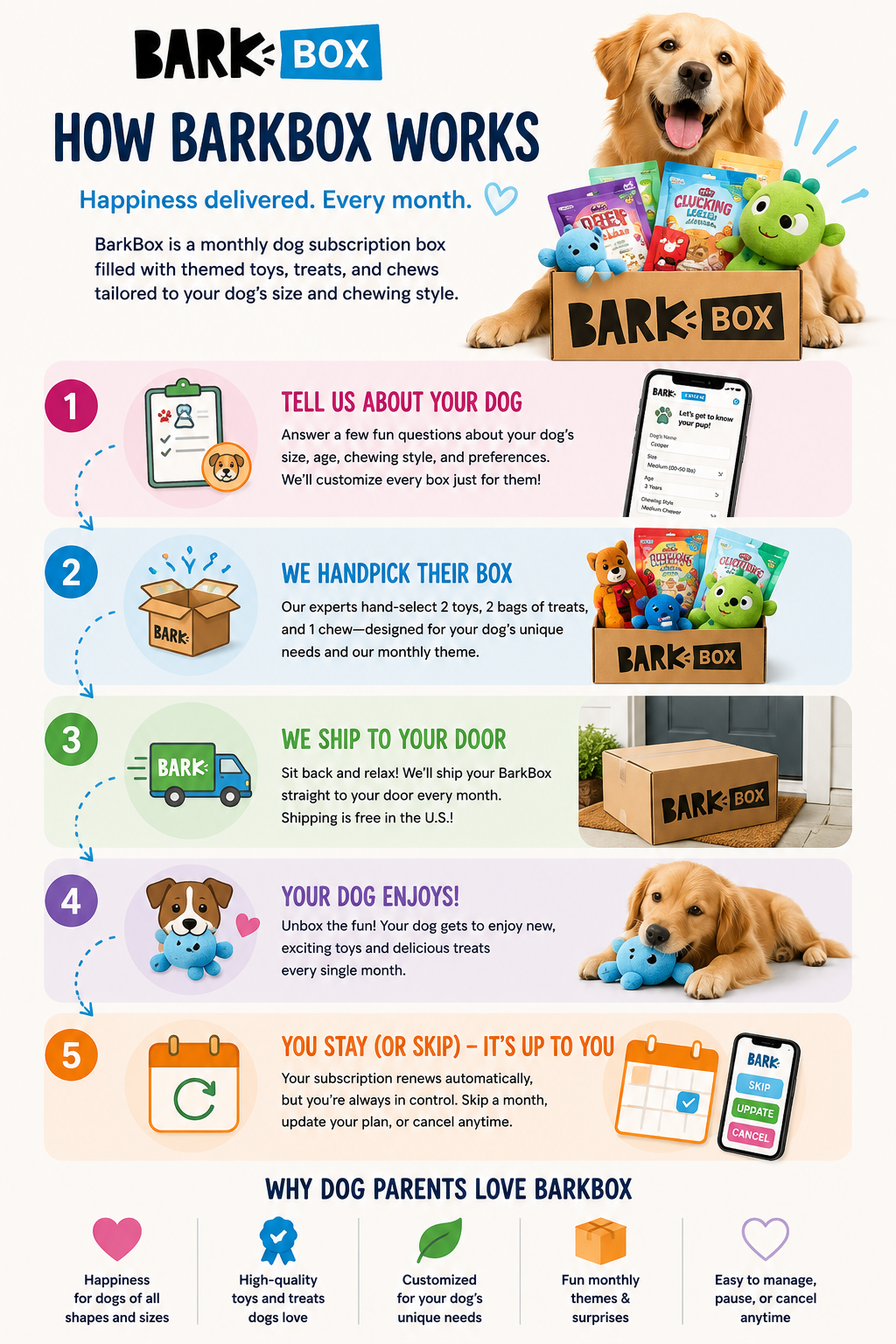
If you own a dog that destroys toys in five minutes, gets bored constantly, or somehow treats every package delivery like it was personally sent to them, you’ve probably looked into BarkBox. The idea behind BarkBox is simple. Every month, subscribers receive a themed box filled with dog toys, treats, and chews customized to their dog’s size and chewing habits. There’s also a tougher version called Super Chewer designed for dogs that absolutely demolish regular toys.
But the real question most dog owners ask before subscribing is simple: Is BarkBox actually worth the money?
After digging through customer experiences, Reddit discussions, reviews, pricing comparisons, and long-term subscriber feedback, the answer is yes for the right type of dog owner. But it’s definitely not perfect for everyone.
One of the biggest reasons BarkBox has stayed popular is because the toys are genuinely more creative than what most people buy at pet stores. Instead of generic squeaky toys, BarkBox leans heavily into funny monthly themes with unique characters, weird designs, and interactive concepts. For a lot of dogs, the novelty matters. Dogs get bored just like humans do, especially high-energy breeds. Many subscribers mention their dogs stay interested in BarkBox toys longer simply because new toys arrive every month.
Another reason people stick with BarkBox is convenience. A surprising number of dog owners eventually realize they already spend BarkBox-level money making random pet store purchases throughout the month anyway. One trip to Target or Petco turns into another rope toy, another bag of treats, another boredom purchase, and suddenly the subscription doesn’t seem that expensive anymore. Several long-term subscribers even mentioned BarkBox reduced their impulse spending because they stopped buying random toys between shipments.
For owners of aggressive chewers, Super Chewer tends to get much better reviews than the standard BarkBox. The toys are designed with stronger rubber, tougher materials, and heavier construction. Many owners of pit bulls, huskies, shepherds, and other destructive breeds say Super Chewer toys survive significantly longer than standard plush toys from pet stores. That said, no dog toy is truly indestructible. Some dogs can still destroy Super Chewer toys surprisingly fast, so expectations matter. If your dog can destroy a Kong toy in one sitting, BarkBox probably won’t perform miracles.
One thing BarkBox does particularly well compared to many subscription services is personalization. Boxes are customized based on dog size, allergies, chewing behavior, and toy preferences. That customization matters because dog owners tend to become extremely picky over time about what treats and toys actually work for their dog. BarkBox reportedly creates massive numbers of unique box combinations each month, and many subscribers appreciate that the company attempts to tailor the experience instead of sending identical boxes to everyone.
Still, BarkBox definitely has weaknesses. One complaint that shows up repeatedly in newer reviews is inconsistency in toy quality. Some longtime subscribers believe the durability and creativity of the toys have declined compared to earlier years. Others mention certain months feel amazing while other boxes feel repetitive or underwhelming. This inconsistency doesn’t necessarily mean BarkBox is bad, but it does mean the experience can vary month to month.
Another funny but very real downside is toy overload. Many subscribers eventually accumulate mountains of dog toys. Owners often joke that their dogs have enough toys to last for years. If your dog isn’t particularly destructive, the toys pile up surprisingly fast. Some people eventually pause or cancel simply because their home starts looking like a small dog toy warehouse.
The subscription model itself can also frustrate some users. BarkBox heavily encourages longer-term plans because the monthly price becomes cheaper with six- or twelve-month commitments. Some customers dislike the auto-renewal structure, upsells, promotional emails, or cancellation process. Customer support reviews online are mixed. Some people praise BarkBox for replacing damaged toys quickly, while others complain about billing frustrations or communication issues.
So who is BarkBox actually best for? Honestly, it works best for busy dog owners with energetic dogs who already spend money regularly on treats and toys. If your dog gets bored easily, destroys toys constantly, or genuinely gets excited by new things, BarkBox can feel surprisingly worthwhile. Many dog owners also enjoy the emotional side of the subscription. Dogs often recognize the box itself when it arrives, and for some families, the monthly unboxing becomes part of their routine.
On the other hand, BarkBox may not make sense for older low-energy dogs, dogs with highly restrictive diets, or owners who only want ultra-durable practical toys. If your dog has been perfectly happy with one tennis ball and an old sock for the last five years, a subscription box may be unnecessary.
The biggest debate around BarkBox usually comes down to value. Is it better than simply buying toys yourself? For some people, yes. Especially if they already make frequent impulse purchases for their pets. But disciplined dog owners who already know exactly which toys and treats work for their dog can probably save money buying selectively instead of subscribing monthly.
The choice between regular BarkBox and Super Chewer is also important. Regular BarkBox focuses more on fun plush toys and themed experiences, while Super Chewer focuses more heavily on durability and practical chewing. For dogs that routinely destroy toys, Super Chewer is almost always the better option.
Overall, BarkBox succeeds because it sells more than just dog toys. It sells convenience, novelty, entertainment, and emotional enjoyment for both dogs and owners. For the right household, that value is absolutely real. It’s not perfect, and some toys won’t survive as long as you hope, but compared to many subscription boxes available today, BarkBox remains one of the more genuinely enjoyable and useful services for dog owners.
From hitting 1 million users in just 5 days to powering nearly a billion weekly users, ChatGPT has completely reshaped how the internet works. These stats break down the insane growth, global reach, and real-world impact of the world’s most dominant AI.

From quirky “As Seen On TV” products to surprisingly practical kitchen tools, these are the most popular videos from the 9malls channel. Take a look at the gadgets that captured hundreds of thousands of views—and find out which ones actually lived up to the hype.

What if there was a smarter way to pay off debt faster—without increasing your income or making huge lifestyle sacrifices? Check out Money Max here and book a free call.
For many people, debt can feel like a never-ending journey. Between mortgages, student loans, credit cards, and car payments, it’s often difficult to see a clear path to financial freedom. What if you had a system that could map out the fastest route to becoming debt-free?
That’s the idea behind the Money Max Account—a financial strategy platform designed to help individuals eliminate debt faster while maximizing the power of every dollar they earn.

What Is the Money Max Account?
The Money Max Account is a financial software system that analyzes your income, expenses, and debts to create a personalized strategy for paying off debt as quickly as possible. Think of it as a “financial GPS” that guides you toward your debt-free destination.
Instead of guessing which loans to pay first or how much extra to send toward your mortgage, the system calculates the most efficient approach using financial algorithms. It continuously evaluates your financial data and suggests the best actions to accelerate debt payoff.
The goal is simple:
Reduce interest payments, shorten loan timelines, and help you build long-term wealth.
How the Money Max System Works
The Money Max Account works by bringing all your financial information into one centralized dashboard and analyzing it in real time.
Here’s how the process typically works:
1. Consolidate Your Financial Data
The platform connects your financial accounts so you can see your debts, income, and expenses in one place. This allows the system to analyze your overall financial situation and identify opportunities to save money.
2. Create a Personalized Debt Strategy
Using advanced algorithms, the system calculates which debts should be paid first and how much money should be directed toward them. It then provides step-by-step guidance on how to allocate funds efficiently.
3. Optimize Every Dollar
Instead of letting money sit idle in accounts, the program identifies ways to redirect available cash toward reducing interest-bearing balances. This can potentially save significant amounts of money over time.
4. Recalculate as Your Finances Change
Any time you make a purchase, receive income, or add a new debt, the system recalculates your payoff timeline and adjusts your strategy accordingly.
This dynamic approach helps keep your financial plan optimized at all times.
Potential Benefits of the Money Max Account
Users of the Money Max system often cite several advantages when following the recommended strategies:
Faster Debt Elimination
By strategically allocating money toward the most impactful debts, users may be able to pay off loans years earlier than traditional payment schedules.
Reduced Interest Payments
Interest can add tens or even hundreds of thousands of dollars to long-term loans. By accelerating principal payments, the system aims to dramatically reduce the amount paid in interest over time.
A Clear Financial Roadmap
Instead of juggling multiple financial decisions, users receive clear instructions on what to do and when to do it.
Long-Term Wealth Building
Once debts are eliminated, the money that was previously used for payments can be redirected toward savings, investments, or other wealth-building opportunities.
Who Can Benefit From It?
The Money Max Account may be particularly useful for people who:
Have multiple types of debt (mortgage, credit cards, car loans, etc.)
Want to pay off their mortgage faster
Struggle with managing multiple financial obligations
Prefer a structured, data-driven financial strategy
Even individuals with moderate incomes can benefit as long as they maintain steady cash flow and follow the system’s recommendations consistently.
Real Results From Users
According to company data, the system has helped tens of thousands of users eliminate debt and save significant amounts in interest. In many cases, users report saving tens or even hundreds of thousands of dollars in interest payments by following the recommended strategies.
While individual results vary, many users report reaching their debt-free goals years earlier than expected.
Final Thoughts
Becoming debt-free doesn’t always require drastic lifestyle changes or extreme budgeting. Sometimes, the key is simply having the right strategy.
The Money Max Account aims to provide that strategy by using financial algorithms and real-time analysis to guide users toward smarter financial decisions. By optimizing how money flows through your accounts, the system helps you reduce interest costs, accelerate debt payoff, and potentially build wealth faster.
If you’re looking for a more structured way to manage your finances and eliminate debt, tools like the Money Max Account may be worth exploring.
Curious how quickly you could eliminate your debt? Check out the free Money Max demo and see how the strategy works.
HelloPrenup is a standout addition to the merchant site 9malls, a platform known for spotlighting innovative products and services that make life easier. This online tool, founded by Julia Rodgers, a former Massachusetts family law attorney, and Sarabeth Jaffe, a software developer, is transforming how couples approach prenuptial agreements. HelloPrenup combines legal expertise with user-friendly technology to offer an affordable, accessible way to create legally binding prenups from home, often in just a few hours. With a mission to reduce the stress and high costs of traditional prenup processes, the platform has gained significant traction, including a notable Shark Tank appearance where it reported a remarkable 14,000% growth, reaching $3 million in lifetime sales and a $22 million valuation. Let’s explore what HelloPrenup offers, dive into user testimonials, and evaluate why it’s a compelling choice for couples planning their financial future together.
HelloPrenup’s strength lies in its streamlined, DIY approach to crafting prenuptial agreements. For a flat fee of $599 per couple—about $300 per partner—users can create a customized prenup tailored to their state’s legal requirements. The platform guides couples through key topics like separate property, marital assets, spousal support, debt, pets, and future inheritances, ensuring all essential aspects are covered. Couples answer a series of questions, negotiate any differences, and generate a document ready to print, sign, and notarize. For those wanting extra support, HelloPrenup offers add-ons like a $99 Q&A session with a licensed attorney or a premium package with attorney review for $699 per partner. Its partnership with Proof, a leading online notarization service, makes the process even smoother by allowing users to notarize agreements online. Available in 32 U.S. states, HelloPrenup is attorney-approved and designed to foster open financial conversations, offering a cost-effective alternative to traditional legal services, which can cost between $3,000 and $10,000.
User testimonials highlight the platform’s ease and effectiveness. On Trustpilot, HelloPrenup boasts a 4-star rating from 140 reviews, with users praising its intuitive design and affordability. One reviewer, Luis Garcia, shared that the process was “easy and smooth,” turning a potentially stressful task into something “fun” and empowering, helping him and his partner feel confident about their future. Another user noted how HelloPrenup’s clear explanations made complex legal topics manageable, even amidst the whirlwind of wedding planning. On the company’s website, a customer named Hank praised the platform, stating that their agreement held up in court, proving its real-world reliability. These stories reflect how HelloPrenup empowers couples to take control of their financial planning with confidence and clarity.
HelloPrenup’s presence on 9malls underscores its appeal as a practical, innovative solution for modern couples. Its affordability, speed, and collaborative approach make it an excellent choice for those with straightforward financial situations looking to avoid the high costs of traditional attorneys. The option to add attorney support ensures flexibility, providing peace of mind for couples in states with specific legal requirements. Featured on a platform like 9malls, which celebrates unique and efficient products, HelloPrenup aligns perfectly with the needs of today’s engaged couples. Its Shark Tank success further validates its growth and potential, making it a trusted option for those seeking a stress-free prenup process. For couples ready to plan their future with transparency and ease, HelloPrenup is a valuable tool worth considering, especially when paired with a quick attorney review to ensure everything is in order.
Video content has become a cornerstone of modern marketing, education, and storytelling. Yet, creating professional-grade videos often feels daunting—time-consuming, expensive, and technically complex. Enter InVideo AI, an AI-powered video creation platform that promises to simplify the process, making it accessible for businesses, content creators, and educators alike. In this blog post, we’ll dive into InVideo AI’s pricing, features, how to use it for your business, its overall quality, and some tips to maximize its potential in 2025. This is one of 9malls newest merchants.
InVideo AI Pricing: Plans for Every Need
InVideo AI offers a range of pricing plans tailored to different users, from solo creators to large businesses. Below is a breakdown of the plans as of 2025, with a 20% discount applied to annual billing where noted. All prices are approximate and based on monthly billing unless specified.
Free Plan ($0/month): Perfect for beginners or those testing the waters, the Free plan offers:
Up to 10 minutes of AI-generated video content per week.
10 GB of storage.
4 exports per week with an InVideo watermark.
Access to over 5,000 templates and a standard media library.
AI script generation and text-to-speech narration.
Limitations: Watermarked videos, no HD exports, and limited access to premium features like iStock media or generative credits.
Plus Plan (~$28/month, $22.40/month annually):
A step up for regular creators, this plan includes:50 minutes of AI-generated content per month.
80 iStock media clips.
100 GB storage.
Unlimited exports without watermarks.
2 AI voice clones for personalized narration.
Best for: Small businesses, bloggers, or YouTubers needing consistent, professional output.
Max Plan (~$48/month, $38.40/month annually):
Designed for high-volume creators, this plan offers:200 minutes of AI-generated content per month.
320 iStock media clips.
400 GB storage.
Up to 5 AI voice clones.
Unlimited exports in full HD.
Best for: Agencies, established businesses, or creators producing frequent content.
Generative Plan (~$96/month, $76.80/month annually):
Tailored for advanced users needing extensive customization:200 minutes of AI generation with up to 15 million generative credits.
Access to premium features for highly customized videos.
Best for: Large organizations or creators with complex, high-volume video needs.
Enterprise Plan (Custom Pricing):
Offers advanced security, flexible pricing, and custom solutions for large organizations. Contact InVideo directly for details.
Tip: InVideo occasionally offers lifetime deals or promotions on platforms like AppSumo, so keep an eye out for discounts. Also, note that quotas (e.g., exports, iStock credits) reset monthly and do not roll over.
Value Proposition: Compared to competitors like Synthesia or Runway, InVideo AI’s pricing is competitive, especially for the Plus and Max plans, offering robust features at a lower cost than tools like Filmora or Camtasia. The Free plan is notably generous, providing more templates and tools than competitors like Canva or Animoto.
Key Features of InVideo AI
InVideo AI combines intuitive design with powerful AI-driven tools to streamline video creation. Here are its standout features:
AI Video Generator: Transform text prompts, scripts, or blog posts into full videos in minutes. The AI selects relevant stock media, generates scripts, and adds voiceovers, making it ideal for repurposing content.
Extensive Template Library: Over 6,000 customizable templates for platforms like YouTube, TikTok, and Instagram Reels, covering everything from ads to tutorials.
Stock Media Library: Access over 16 million royalty-free assets, including images, videos, and music from iStock, Shutterstock, and Storyblocks (premium assets vary by plan).
AI Voiceovers and Cloning: Choose from over 30 high-quality AI voices in multiple languages or create personalized voice clones. While not perfect for nuanced storytelling, they’re excellent for marketing and explainer videos.
Text-to-Video Conversion: Convert blog posts or articles into engaging videos with AI-selected visuals and transitions, perfect for content marketers.
Clipmaker for Short-Form Content: Turn long-form videos into bite-sized clips for social media with simple cut, snap, and trim tools.
Real-Time Collaboration: Multiplayer editing allows teams to work together seamlessly.
Drag-and-Drop Editor: An intuitive interface lets users customize templates, text, colors, and media without technical skills.
Brand Kits: Save logos, colors, and fonts for consistent branding across projects, a must for agencies and marketing teams.
Mobile App: Edit on the go with iOS and Android apps, though the web platform is more robust for complex edits.
Recent Updates (2025): InVideo AI v3.0 enhances full video generation from prompts, including scripts, visuals, and voiceovers, reducing reliance on manual tweaks compared to earlier versions.
How to Use InVideo AI for Your Business
InVideo AI is a versatile tool for businesses of all sizes, from startups to enterprises. Here’s a step-by-step guide to leveraging it effectively:
Sign Up and Choose a Plan: Visit invideo.io and sign up using Google, Apple, or email. Start with the Free plan to explore, then upgrade based on your needs.
Select a Workflow or Template: Choose from six premade workflows (e.g., YouTube Shorts, TikTok) or browse the template library by category (e.g., marketing, education). Use the search bar for specific goals.
Input Your Prompt: Write a detailed text prompt (e.g., “Create a 30-second TikTok video for a fitness app, showcasing workout tracking with an upbeat tone and a call-to-action”). Specify tone, audience, platform, and duration for best results.
Customize the Output: Use the drag-and-drop editor or text-based “Magic Box” to tweak visuals, text, voiceovers, or pacing. Upload your own media or use the stock library for personalization.
Review and Export: Check for errors, ensure brand consistency, and export in your desired resolution (up to 1080p). Share directly to social media or download for later use.
Integrate with Your Workflow: Pair with tools like Buffer or Later for automated social media posting, or use InVideo’s analytics to track engagement.
Business Use Cases:
Marketers: Create quick ads, product demos, or social media snippets to boost brand visibility.
Ecommerce: Generate product promos or tutorials to drive conversions.
Educators: Produce engaging e-learning videos or presentations.
Content Creators: Repurpose blogs into YouTube videos or create viral TikTok clips.
Agencies: Use brand kits and collaboration tools to manage client projects efficiently.
Pro Tip: For optimal results, write clear, specific prompts. For example, “Create a 60-second YouTube explainer video for a SaaS product, targeting startups, with a professional female voiceover and a problem-solution structure.” Experiment with different voices and tones to match your brand.
Is InVideo AI Any Good?
InVideo AI has earned strong praise for its ease of use, affordability, and versatility, with ratings averaging above 4.5/5 on platforms like G2 and Trustpilot. Here’s a balanced look at its strengths and weaknesses:
Pros:
User-Friendly: The intuitive interface and drag-and-drop functionality make it accessible for beginners, with no editing experience required.
Time-Saving: AI automation cuts video production time from hours to minutes, ideal for high-volume content needs.
Versatile: Supports a wide range of use cases, from social media to corporate presentations, with multilingual voiceovers for global audiences.
Affordable: Competitive pricing compared to Synthesia or Runway, with a robust Free plan.
Strong Support: 24/7 live chat, a helpful Facebook group, and extensive documentation.
Cons:
AI Limitations: Complex prompts or technical terms may result in less accurate visuals or voiceover pronunciations, requiring manual tweaks.
Occasional Glitches: Some users report slowdowns or bugs with complex edits or longer videos.
Watermark on Free Plan: Limits commercial use unless you upgrade.
Internet Dependency: As a cloud-based tool, it requires a stable connection, with no offline editing option.
Not for Advanced Editing: Lacks the precision of tools like Adobe Premiere for cinematic or highly customized projects.
User Feedback: On Reddit, users praise the text-to-video feature and natural-sounding AI voiceovers but note occasional scene transition glitches. G2 reviews highlight the extensive template library and value for small teams, while some Quora users report mixed experiences with stock media relevance.
Verdict: InVideo AI is an excellent choice for businesses, marketers, and creators prioritizing speed, affordability, and ease of use. It’s not perfect for high-end, movie-style editing, but for marketing videos, social media content, or educational materials, it’s a game-changer.
Why InVideo AI Stands Out in 2025
InVideo AI’s combination of AI automation, a vast media library, and an intuitive editor makes it a top contender in the AI video space. Here are a few reasons it’s worth considering:
Scalability: From solo creators to large agencies, its pricing and features cater to diverse needs.
Global Reach: Multilingual voiceovers and subtitles support businesses targeting international audiences.
Business Growth: InVideo AI closed FY 2024 with $30 million in revenue and is projected to hit $50 million in 2025, with a valuation of $200 million, reflecting strong user growth and trust.
Community and Resources: InVideo’s blog, YouTube channel, and community offer tutorials and inspiration, helping users maximize the platform.
Unique Angle: Unlike competitors like Animaker, which focuses heavily on animated videos, InVideo AI balances AI-driven automation with traditional editing, offering flexibility for both quick content and polished projects. Its integrations with platforms like YouTube and data systems (for Enterprise plans) add further value.
Tips to Get the Most Out of InVideo AI
Leverage Brand Kits: Upload your logo and brand colors to maintain consistency across videos.
Experiment with Prompts: Test different tones and structures to find what resonates with your audience.
Use the Clipmaker: Repurpose long-form content into short clips for TikTok or Instagram to maximize reach.
Combine with Other Tools: Pair InVideo with analytics tools or social media schedulers for a streamlined workflow.
Final Thoughts
InVideo AI is a powerful, user-friendly tool that democratizes video creation for businesses, creators, and educators. Its affordable pricing, robust feature set, and AI-driven automation make it ideal for producing professional videos quickly, especially for marketing and social media. While it has some limitations—like occasional glitches or less precise AI outputs for complex prompts—it delivers exceptional value for its cost. Whether you’re a small business owner crafting product promos, a YouTuber churning out explainer videos, or an agency managing client projects, InVideo AI can streamline your workflow and elevate your content in 2025.
Ready to try it?
Sign up for the Free plan at invideo.io and start creating stunning videos today.
Looking to spark a love for science and discovery?
The Curiosity Box from Vsauce and a new partner here at 9malls, available at CuriosityBox.com, delivers quarterly boxes packed with STEM-focused experiments, puzzles, and educational goodies right to your door. This subscription is designed to ignite curiosity and make learning fun for kids, teens, and adults alike. In this guide, we’ll explore why The Curiosity Box is a must-have for anyone passionate about science, share tips for maximizing your experience, and highlight what makes it so special.
What Makes The Curiosity Box Unique?
The Curiosity Box isn’t just a subscription—it’s a curated journey into the wonders of science. Each box includes:
Engaging STEM Toys and Puzzles: From shadow-casting magnets to mind-bending logic games, every item is crafted to challenge and inspire.
Exclusive Content: Access to Vsauce videos and resources that dive deeper into the science behind the box’s contents.
High-Quality Materials: Built to last, these items are perfect for repeated experiments and explorations.
Priced at $60 per quarter or $220 for an annual subscription, The Curiosity Box offers incredible value for its educational impact and hands-on fun.
Why The Curiosity Box Is Worth It
The Curiosity Box delivers exceptional value for curious minds. Here’s why it stands out:
Appeals to All Ages: Whether you’re a parent inspiring your kids or an adult who loves solving puzzles, there’s something for everyone.
Supports STEM Education: A portion of every purchase goes to Alzheimer’s research, so your subscription makes a difference.
Builds a Community: Join thousands of subscribers sharing their experiments and discoveries online, creating a vibrant learning network.
A recent review praised the box’s “neat” contents, noting that the educational impact and replayability make it a standout. It’s a fantastic way to bring science to life.
Tips to Maximize Your Curiosity Box Experience
To get the most out of your subscription, try these ideas:
Host a Science Night: Turn the box’s contents into a family or classroom event. The puzzles and experiments are perfect for group activities.
Dive Into the Extras: Explore the exclusive Vsauce videos for added context and a deeper learning experience.
Share Your Journey: Post your puzzle solutions or experiment results on social media with #CuriosityBox to connect with other subscribers and inspire others.
Why Subscribe to The Curiosity Box?
The Curiosity Box is more than a collection of science toys—it’s a gateway to lifelong learning and discovery. Each delivery encourages critical thinking, creativity, and a passion for exploration. Whether you’re gifting it to a young scientist or treating yourself to a quarterly dose of wonder, it’s an investment in curiosity.
Final Thoughts: Start Your Science Adventure Today
Ready to unlock a world of scientific discovery? Head to CuriosityBox.com
Watch the 9malls review of the Ghudubia 63 Inch Farmhouse Drawers Dresser Storage Furniture Piece. Would this really make a good dresser for a bedroom or living room? Watch the hands on furniture build test to find out. #gadgets #gadgetreview #furnituredesign #furniture #furniturereview
Find As Seen On TV Products & Gadgets at the 9malls Store:
https://www.amazon.com/shop/9malls
Please support us on Patreon!
https://www.patreon.com/9malls
Disclaimer: I may also receive compensation if a visitor clicks through to 9malls, or makes a purchase through Amazon or any affiliate link. I test each product on site thoroughly and give high marks to only the best. In the above video I received a free product sample to test. We are independently owned and the opinions expressed here are our own.
Welcome to the new year with Butcher Box, where your journey towards healthier, tastier meals begins! Butcher Box is not just another meat delivery service; it’s a commitment to quality, sustainability, and convenience.
Each box is curated with 100% grass-fed beef, free-range organic chicken, heritage breed pork, and wild-caught seafood, all delivered straight to your door. Whether you’re aiming to eat healthier, cook more at home, or simply enjoy the finest cuts of meat, Butcher Box makes it easy to elevate your culinary experience right from the start of the year. Say goodbye to the hassle of grocery shopping for quality meat and hello to a year of delicious, guilt-free dining.
Visit Butcher Box for their introductory offer.
Watch the 9malls review and unboxing of Butcher Box Meat Food Box. Will I be switching my current Good Ranchers subscription service for Butcher Box? Watch the hands on unboxing and review to find out. #butcherbox #foodreview #meatbox #meat #foodboxes
– Visit Butcher Box Introductory Offer:
https://butcherbox.pxf.io/xkBGmR
Disclaimer: I may also receive compensation if a visitor clicks through to 9malls, or makes a purchase through Amazon or any affiliate link. I test each product on site thoroughly and give high marks to only the best. In the above video I received a free product sample to test. We are independently owned and the opinions expressed here are our own.